

Give your videos a modern, colorful, and visually distinctive look with Free Color Glass Typography MOGRT, a motion graphics title template designed for Adobe Premiere Pro. Glass-inspired typography combines transparent or translucent visual treatments with vibrant colors to create an eye-catching text presentation. This style can add depth, personality, and a contemporary aesthetic to titles, headings, promotional messages, and social media videos.
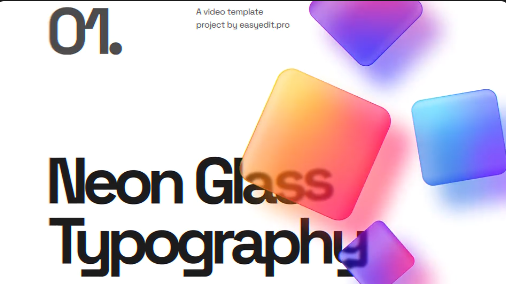
A Free Color Glass Typography Template is a useful starting point for editors who want to create stylish animated text without building every graphic from scratch. The MOGRT format, short for Motion Graphics Template, allows supported motion graphics designs to be used directly within Premiere Pro. Depending on the template's exposed controls, you may be able to edit the text, adjust colors, change sizing, and customize other available properties to fit your project.
Whether you are producing a YouTube video, a product advertisement, a fashion promo, a music video, or a creative social media edit, colorful glass-style typography can help your titles stand out while maintaining a polished visual appearance.
This Free Glass Text Effect MOGRT can be used to introduce a video topic, emphasize a key phrase, display a name, or present a promotional message. Depending on the original design, the typography may feature colorful glass-like surfaces, translucent layers, reflections, soft highlights, or other decorative treatments.
The effect works particularly well when the text remains easy to read against the background. Choose appropriate wording and keep the composition uncluttered so that the visual treatment enhances the message instead of competing with it.
For Instagram Reels, YouTube Shorts, and other vertical video formats, check whether the template can be adapted to the required aspect ratio. Keep the text within the visible area and make sure the typography remains readable on smaller screens.
You can also use glass-style titles to highlight important moments in a video, introduce a new section, or create a consistent title treatment across a series of uploads. Coordinating the typography with your channel's colors and visual identity can help your content look more cohesive.
This style can suit beauty and fashion campaigns, creative agency promos, technology advertisements, entertainment promotions, event announcements, and digital product presentations. A carefully designed title can draw attention to a message while supporting the overall creative direction of the campaign.
For brand-focused projects, choose colors that complement the company's visual identity. Use the glass effect selectively when the goal is a clean, premium, or modern presentation. If the design already contains vibrant colors and complex imagery, simpler text placement may provide better visual balance.
The Free Glass Typography MOGRT can also be used in motion-driven promotional edits and experimental visual projects. Depending on the available animation, you may be able to coordinate the appearance of the text with a beat, a scene change, or a key moment in the soundtrack.
For cinematic projects, consider the mood and pacing of the footage. Bright, colorful typography may suit energetic or futuristic visuals, while more restrained colors can complement elegant product shots or atmospheric scenes. Always keep the title readable and give the animation enough time to communicate its message.
Depending on the template's configuration, editable properties may include text content, font options, colors, scale, position, duration, or other design settings. Not every template exposes every property, so review the included instructions and available controls before editing.
To get started, install or import the MOGRT using a supported Premiere Pro workflow, add it to your timeline, and inspect the Essential Graphics or Properties controls available in your version of the software. Replace any placeholder text and adjust the design to match the surrounding footage.
For a professional result, use concise wording, select suitable colors, and check the typography at the final export resolution. If the template relies on specific fonts, effects, or software features, make sure the necessary requirements are met before starting your project.
Use a consistent color palette: Coordinate the glass colors with your brand or video theme instead of introducing too many unrelated colors.
Keep titles concise: Short phrases often work best for animated typography because viewers can read them quickly.
Match the animation to the footage: Use energetic movement for fast-paced edits and more restrained timing for elegant or cinematic content.
Choose the right placement: Position text where it does not obscure faces, products, subtitles, or other important visual information.
Preview on different screens: Check the title on both desktop and mobile-sized previews to ensure that small details remain visible.
Maintain visual consistency: Use a coordinated approach to typography, color, and animation across related scenes.
Check compatibility and assets: Review the MOGRT requirements, font availability, and licensing terms before using the template in your final production.
It can be useful for title sequences, product advertisements, fashion edits, music videos, social media campaigns, channel branding, promotional content, and creative presentations. With thoughtful customization, glass-style typography can help give your videos a distinctive visual identity.
Give your titles a modern, colorful look with glass-inspired typography that complements your footage and creative direction. Whether you are creating social media content, a product promo, a music video, or a professional brand presentation, a well-customized MOGRT can help make your text more engaging and your videos more polished.
A Free Color Glass Typography Template is a useful starting point for editors who want to create stylish animated text without building every graphic from scratch. The MOGRT format, short for Motion Graphics Template, allows supported motion graphics designs to be used directly within Premiere Pro. Depending on the template's exposed controls, you may be able to edit the text, adjust colors, change sizing, and customize other available properties to fit your project.
Whether you are producing a YouTube video, a product advertisement, a fashion promo, a music video, or a creative social media edit, colorful glass-style typography can help your titles stand out while maintaining a polished visual appearance.
Create Modern Glass-Inspired Typography
Glass typography is a visual style that uses the appearance of translucent surfaces, color variations, highlights, and layered shapes to create an elegant text effect. When combined with animation, it can make simple words and headings feel more dynamic and visually engaging.This Free Glass Text Effect MOGRT can be used to introduce a video topic, emphasize a key phrase, display a name, or present a promotional message. Depending on the original design, the typography may feature colorful glass-like surfaces, translucent layers, reflections, soft highlights, or other decorative treatments.
The effect works particularly well when the text remains easy to read against the background. Choose appropriate wording and keep the composition uncluttered so that the visual treatment enhances the message instead of competing with it.
Perfect for YouTube Videos and Social Media Content
Content creators can use Free Color Glass Typography for YouTube intros, video headings, channel branding, social media announcements, short-form videos, and creative edits. The colorful appearance can complement lifestyle content, fashion videos, technology reviews, design tutorials, entertainment videos, and personal branding projects.For Instagram Reels, YouTube Shorts, and other vertical video formats, check whether the template can be adapted to the required aspect ratio. Keep the text within the visible area and make sure the typography remains readable on smaller screens.
You can also use glass-style titles to highlight important moments in a video, introduce a new section, or create a consistent title treatment across a series of uploads. Coordinating the typography with your channel's colors and visual identity can help your content look more cohesive.
Useful for Advertising, Branding, and Product Promotions
Colorful typography can add a contemporary visual touch to digital advertising and promotional videos. Businesses and marketers can use a Free Color Typography Template to highlight product names, announce launches, present special messages, or introduce services.This style can suit beauty and fashion campaigns, creative agency promos, technology advertisements, entertainment promotions, event announcements, and digital product presentations. A carefully designed title can draw attention to a message while supporting the overall creative direction of the campaign.
For brand-focused projects, choose colors that complement the company's visual identity. Use the glass effect selectively when the goal is a clean, premium, or modern presentation. If the design already contains vibrant colors and complex imagery, simpler text placement may provide better visual balance.
Add Creative Titles to Music Videos and Cinematic Edits
Music videos, visualizers, fashion films, and cinematic montages often benefit from distinctive typography. A glass-inspired title can introduce a song, display an artist's name, highlight a lyric-free title card, or create a transition between different sections of a video.The Free Glass Typography MOGRT can also be used in motion-driven promotional edits and experimental visual projects. Depending on the available animation, you may be able to coordinate the appearance of the text with a beat, a scene change, or a key moment in the soundtrack.
For cinematic projects, consider the mood and pacing of the footage. Bright, colorful typography may suit energetic or futuristic visuals, while more restrained colors can complement elegant product shots or atmospheric scenes. Always keep the title readable and give the animation enough time to communicate its message.
Customize the MOGRT in Adobe Premiere Pro
This Free Premiere Pro MOGRT Template is intended for use with Adobe Premiere Pro, subject to the compatibility requirements of the original file. MOGRT templates allow supported motion graphics designs to be added to a Premiere Pro timeline, where editors can adjust the controls made available by the template creator.Depending on the template's configuration, editable properties may include text content, font options, colors, scale, position, duration, or other design settings. Not every template exposes every property, so review the included instructions and available controls before editing.
To get started, install or import the MOGRT using a supported Premiere Pro workflow, add it to your timeline, and inspect the Essential Graphics or Properties controls available in your version of the software. Replace any placeholder text and adjust the design to match the surrounding footage.
For a professional result, use concise wording, select suitable colors, and check the typography at the final export resolution. If the template relies on specific fonts, effects, or software features, make sure the necessary requirements are met before starting your project.
Tips for Creating Professional Glass Typography
Prioritize readability: Colorful effects should never make the main message difficult to understand. Choose a suitable background and maintain enough contrast.Use a consistent color palette: Coordinate the glass colors with your brand or video theme instead of introducing too many unrelated colors.
Keep titles concise: Short phrases often work best for animated typography because viewers can read them quickly.
Match the animation to the footage: Use energetic movement for fast-paced edits and more restrained timing for elegant or cinematic content.
Choose the right placement: Position text where it does not obscure faces, products, subtitles, or other important visual information.
Preview on different screens: Check the title on both desktop and mobile-sized previews to ensure that small details remain visible.
Maintain visual consistency: Use a coordinated approach to typography, color, and animation across related scenes.
Check compatibility and assets: Review the MOGRT requirements, font availability, and licensing terms before using the template in your final production.
Who Can Benefit from This Free MOGRT Template?
The Free Color Glass Typography MOGRT is suitable for video editors, YouTubers, graphic designers, motion designers, social media creators, digital marketers, freelancers, and creative agencies. Beginners can use a ready-made title design to improve their video presentations, while experienced editors can incorporate the template into more extensive editing workflows.It can be useful for title sequences, product advertisements, fashion edits, music videos, social media campaigns, channel branding, promotional content, and creative presentations. With thoughtful customization, glass-style typography can help give your videos a distinctive visual identity.
Explore Free Color Glass Typography on Freevideofx
Looking for a Free Color Glass Typography MOGRT, a colorful text animation, or a Premiere Pro title template for your next project? Freevideofx helps creators discover video editing resources and motion graphics assets for a wide range of creative needs. Explore available template details, verify compatibility with your version of Premiere Pro, and check the licensing terms before using an asset in personal or commercial projects.Give your titles a modern, colorful look with glass-inspired typography that complements your footage and creative direction. Whether you are creating social media content, a product promo, a music video, or a professional brand presentation, a well-customized MOGRT can help make your text more engaging and your videos more polished.


