

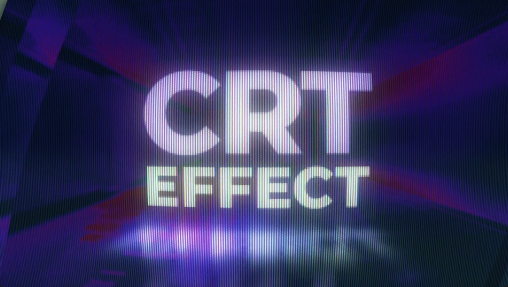
Give your videos a nostalgic retro appearance with the Free CRT Effect – RGB TV Screens. Inspired by classic cathode-ray tube (CRT) televisions and vintage computer monitors, this visual effect is designed to recreate the distinctive look of older display technology. It can help you add retro character, analog-inspired distortion, RGB colour separation, and a vintage electronic atmosphere to your video editing projects.
Whether you are creating a retro gaming video, a music visualizer, a cinematic sequence, a glitch-style edit, or a nostalgic social media reel, CRT-inspired effects can transform ordinary footage into something visually distinctive. This Free CRT Effect resource is suitable for video editors, motion designers, gaming creators, filmmakers, and digital artists looking to explore the aesthetic of classic television screens.
The Free CRT Effect – RGB TV Screens can serve as a starting point for recreating this nostalgic display aesthetic. Depending on the original asset's features, the effect may incorporate scanlines, RGB colour separation, screen distortion, flicker, image curvature, noise, or other analog-inspired visual details.
These characteristics can make footage appear as though it is being displayed on an old television or vintage monitor. The exact appearance and available customization options depend on the supplied project or effect files.
This technique can be useful for establishing a retro-futuristic atmosphere, adding visual energy to fast-paced edits, or creating a deliberately imperfect analog look. Depending on the original effect, you may be able to adjust the intensity of colour separation, distortion, or other available parameters.
For professional results, use stronger distortion for brief transitions or stylized sequences and more restrained settings when the footage needs to remain clear and readable.
It can also be used in gaming montages, channel introductions, highlight videos, and promotional content inspired by the visual language of older consoles and arcade machines.
When applying the effect to gameplay footage, consider keeping important interface elements and on-screen text readable. A moderate amount of scanlines or colour distortion can create a retro atmosphere without making the content difficult to follow.
You can combine the effect with neon colours, geometric graphics, animated typography, dark backgrounds, and rhythmic editing to create a cohesive visual presentation.
For music-related projects, coordinate the intensity of distortion, flicker, and transitions with the rhythm of the soundtrack. Use appropriately licensed music and sound effects when publishing or distributing the finished video.
Possible applications include:
If the asset is supplied as an Adobe After Effects project, open it in a compatible version of After Effects and examine the available compositions, layers, and effect controls. If it is provided as a plugin, preset, overlay, or rendered video, follow the creator's installation and usage instructions.
Depending on the original asset's features, customization may include:
Start with subtle adjustments. Introduce a small amount of RGB separation or scanline texture and increase the intensity only when the creative direction requires it.
Match the footage. Retro gaming, vintage graphics, and digital interfaces may benefit from stronger effects, while detailed live-action footage may require a more restrained treatment.
Preserve readability. Keep important text, logos, and interface elements clear enough for viewers to understand.
Combine effects carefully. Scanlines, noise, colour separation, and flicker can work together, but excessive layering may reduce image quality.
Use distortion selectively. Brief bursts of stronger distortion can create effective transitions without making an entire video uncomfortable to watch.
Check the final export. Review the effect at the intended resolution and frame rate to ensure that fine scanlines and colour details render as expected.
It can benefit beginner video editors learning about colour-channel separation, motion designers creating retro graphics, gaming creators producing nostalgic content, and experienced professionals building stylized sequences.
The effect can also help establish a consistent visual treatment across a collection of videos, provided the asset supports the required workflow and customization. Final results will depend on the original files, the editing software, and the settings used.
Before using the effect in commercial or client work, review the applicable licensing terms. Free availability does not automatically mean unrestricted commercial use, redistribution, or resale is permitted.
Explore Free creative resources on Freevideofx to discover video effects, editing templates, and motion graphics assets for your next project. Experiment with the available settings, find the right balance between RGB distortion and image clarity, and create a retro-inspired look that fits your creative vision.
Whether you are creating a retro gaming video, a music visualizer, a cinematic sequence, a glitch-style edit, or a nostalgic social media reel, CRT-inspired effects can transform ordinary footage into something visually distinctive. This Free CRT Effect resource is suitable for video editors, motion designers, gaming creators, filmmakers, and digital artists looking to explore the aesthetic of classic television screens.
Classic CRT Television Screen Appearance
CRT displays were widely used in televisions, arcade machines, and computer monitors before modern flat-panel screens became common. Their characteristic visual appearance has become a popular creative style in retro gaming, music videos, experimental filmmaking, and digital design.The Free CRT Effect – RGB TV Screens can serve as a starting point for recreating this nostalgic display aesthetic. Depending on the original asset's features, the effect may incorporate scanlines, RGB colour separation, screen distortion, flicker, image curvature, noise, or other analog-inspired visual details.
These characteristics can make footage appear as though it is being displayed on an old television or vintage monitor. The exact appearance and available customization options depend on the supplied project or effect files.
RGB Colour Separation and Retro Distortion
RGB colour separation is a recognizable visual technique in which red, green, and blue colour channels appear slightly displaced from one another. When combined with CRT-inspired styling, it can create a subtle chromatic fringe or a more pronounced distorted appearance.This technique can be useful for establishing a retro-futuristic atmosphere, adding visual energy to fast-paced edits, or creating a deliberately imperfect analog look. Depending on the original effect, you may be able to adjust the intensity of colour separation, distortion, or other available parameters.
For professional results, use stronger distortion for brief transitions or stylized sequences and more restrained settings when the footage needs to remain clear and readable.
Perfect for Retro Gaming Videos
Gaming creators can use Free CRT-style effects to reproduce the nostalgic appearance of classic arcade games and older gaming systems. The effect can complement pixel art, vintage gameplay footage, retro gaming reviews, emulator recordings, and gaming history documentaries.It can also be used in gaming montages, channel introductions, highlight videos, and promotional content inspired by the visual language of older consoles and arcade machines.
When applying the effect to gameplay footage, consider keeping important interface elements and on-screen text readable. A moderate amount of scanlines or colour distortion can create a retro atmosphere without making the content difficult to follow.
Ideal for Music Videos and Visualizers
CRT-inspired RGB effects can add a distinctive analog texture to music videos, lyric videos, electronic music visuals, visualizers, and performance edits. They work particularly well with synthwave, vaporwave, electronic music, cyberpunk-inspired visuals, and other styles influenced by retro technology.You can combine the effect with neon colours, geometric graphics, animated typography, dark backgrounds, and rhythmic editing to create a cohesive visual presentation.
For music-related projects, coordinate the intensity of distortion, flicker, and transitions with the rhythm of the soundtrack. Use appropriately licensed music and sound effects when publishing or distributing the finished video.
Create VHS, Glitch, and Cyberpunk-Inspired Videos
The visual language of CRT screens often overlaps with other retro digital aesthetics, including VHS-style distortion, analog noise, chromatic aberration, and glitch-inspired graphics. This makes the Free CRT Effect – RGB TV Screens useful for experimental edits and stylized cinematic sequences.Possible applications include:
- Cyberpunk videos: Add a vintage electronic appearance to futuristic environments, digital interfaces, and science-fiction scenes.
- Horror projects: Create unsettling monitor footage for suspense sequences, found-footage-style scenes, and atmospheric trailers.
- Retro advertisements: Give promotional videos a nostalgic television-inspired presentation.
- Social media content: Enhance short-form edits with distinctive colour distortion and analog-inspired visuals.
- Documentary videos: Recreate the visual atmosphere of historical television footage or older computer displays where appropriate.
- Motion graphics: Add texture and character to animated titles, logos, digital screens, and abstract compositions.
Customization and Editing Guide
Before using the Free CRT Effect – RGB TV Screens, inspect the original download package to confirm its file format, supported software, installation requirements, and compatibility.If the asset is supplied as an Adobe After Effects project, open it in a compatible version of After Effects and examine the available compositions, layers, and effect controls. If it is provided as a plugin, preset, overlay, or rendered video, follow the creator's installation and usage instructions.
Depending on the original asset's features, customization may include:
- RGB separation: Adjust the available colour-channel offset to create a subtle or more dramatic retro appearance.
- Scanlines: Control the visibility or intensity of horizontal display lines if supported.
- Distortion: Modify available settings to simulate screen irregularities or analog-style image warping.
- Flicker and noise: Use supported controls to introduce a vintage electronic atmosphere.
- Colour grading: Adjust contrast, saturation, and tonal balance to match the intended retro aesthetic.
- Animation timing: Apply the effect to selected sections of your footage or coordinate it with transitions where the workflow allows.
Tips for Achieving a Realistic CRT Look
A convincing CRT-inspired effect usually depends on balancing several visual characteristics rather than maximizing every distortion setting.Start with subtle adjustments. Introduce a small amount of RGB separation or scanline texture and increase the intensity only when the creative direction requires it.
Match the footage. Retro gaming, vintage graphics, and digital interfaces may benefit from stronger effects, while detailed live-action footage may require a more restrained treatment.
Preserve readability. Keep important text, logos, and interface elements clear enough for viewers to understand.
Combine effects carefully. Scanlines, noise, colour separation, and flicker can work together, but excessive layering may reduce image quality.
Use distortion selectively. Brief bursts of stronger distortion can create effective transitions without making an entire video uncomfortable to watch.
Check the final export. Review the effect at the intended resolution and frame rate to ensure that fine scanlines and colour details render as expected.
Benefits of Using a Free CRT Effect
Creating a convincing vintage television appearance manually can require several layers of effects, detailed adjustments, and repeated testing. A Free CRT Effect – RGB TV Screens asset provides a useful starting point for editors who want to explore the style more efficiently.It can benefit beginner video editors learning about colour-channel separation, motion designers creating retro graphics, gaming creators producing nostalgic content, and experienced professionals building stylized sequences.
The effect can also help establish a consistent visual treatment across a collection of videos, provided the asset supports the required workflow and customization. Final results will depend on the original files, the editing software, and the settings used.
Before using the effect in commercial or client work, review the applicable licensing terms. Free availability does not automatically mean unrestricted commercial use, redistribution, or resale is permitted.
Download Free CRT Effect – RGB TV Screens from Freevideofx
The Free CRT Effect – RGB TV Screens is a useful creative resource for retro gaming videos, analog-inspired music visuals, glitch edits, cyberpunk sequences, and vintage television-style motion graphics. With thoughtful adjustments, it can help transform standard footage into a distinctive visual experience inspired by classic display technology.Explore Free creative resources on Freevideofx to discover video effects, editing templates, and motion graphics assets for your next project. Experiment with the available settings, find the right balance between RGB distortion and image clarity, and create a retro-inspired look that fits your creative vision.


