

The Free HUD Multipurpose Game Template is a versatile visual asset designed for gaming videos, futuristic motion graphics, technology presentations, and digital content that requires a high-tech interface. Inspired by heads-up displays (HUDs) commonly seen in science-fiction films, modern video games, and advanced computer systems, this template helps creators build an engaging, futuristic atmosphere for their projects.
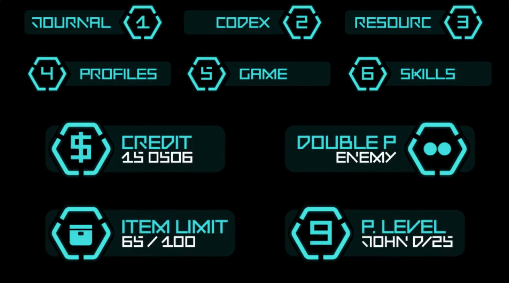
With its digital interface aesthetic, this multipurpose gaming HUD design can complement gameplay videos, esports content, gaming trailers, promotional videos, cinematic sequences, and technology-focused presentations. It is a useful option for creators looking for a Free visual resource to enhance their content with a modern, immersive, and technologically advanced appearance.
The Free HUD Multipurpose Game Template is suitable for a variety of creative projects where a technology-inspired visual style is important. Depending on the original template's features, you may be able to customize its text, colours, graphic elements, animation timing, and other editable components to match your project's requirements.
You can incorporate the design into gameplay highlights, match introductions, gaming montages, tournament promotions, channel branding, and esports event videos. When used thoughtfully, HUD graphics can strengthen the overall presentation and help create a consistent visual identity for your gaming channel.
Gaming and esports: Create engaging video introductions, gameplay highlights, tournament promotions, team presentations, and gaming advertisements.
YouTube and social media: Enhance gaming reels, short-form videos, channel trailers, livestream promotional content, and highlight compilations with a digital interface aesthetic.
Sci-fi films and cinematic videos: Use HUD-inspired elements in futuristic scenes, action sequences, science-fiction trailers, and experimental motion graphics.
Technology presentations: Add a modern digital look to presentations about artificial intelligence, robotics, software, virtual reality, cybersecurity, and advanced technology.
Product promotions: Complement promotional videos for gaming accessories, computer hardware, gaming laptops, peripherals, and technology products.
Creative portfolios: Demonstrate motion design skills through futuristic interface compositions, experimental animation projects, and technology-inspired visual presentations.
If the asset is supplied as an After Effects project, open it in a compatible version of Adobe After Effects and review the project structure before making changes. Depending on the original template's features, you may be able to adjust available text layers, colours, graphic elements, animation duration, and composition settings.
Replace placeholder text with relevant information such as a gaming channel name, player ID, team name, project title, or promotional message wherever editable text fields are available. Choose colours that complement your footage and brand identity, and maintain sufficient contrast so that interface elements remain visible against the background.
You can also adjust the timing of the animation to coordinate with gameplay footage, sound effects, music, or transitions. If the template contains multiple compositions or interface elements, review each component carefully to understand how it can be used in your final video.
When combining the HUD graphics with gameplay footage, check that the interface remains visible without covering important action. For social media videos, consider the intended aspect ratio and safe areas before exporting. Vertical formats may require repositioning or resizing elements, depending on the available project controls.
For cinematic projects, coordinate the graphic animation with camera movement, sound design, and scene transitions. Subtle sound effects and carefully timed visual changes can make the interface feel more integrated into the footage.
Before final export, preview the entire animation, check for missing fonts or assets, verify that the project renders correctly, and confirm that the output resolution and frame rate meet your delivery requirements.
It can be particularly helpful for beginner motion designers learning about digital interface animation, gaming creators improving their video presentation, freelancers producing concept videos, and experienced editors looking for additional visual resources for their projects.
As with any downloadable asset, review the included files and licensing terms before using the template in commercial work. Free availability does not automatically mean unrestricted commercial use, and software compatibility may vary according to the original project file.
Explore Free creative resources on Freevideofx to discover templates and visual assets for your next editing project. Customize the available elements, combine the graphics with suitable footage, and create a distinctive futuristic experience for your audience.
With its digital interface aesthetic, this multipurpose gaming HUD design can complement gameplay videos, esports content, gaming trailers, promotional videos, cinematic sequences, and technology-focused presentations. It is a useful option for creators looking for a Free visual resource to enhance their content with a modern, immersive, and technologically advanced appearance.
Futuristic HUD Design for Gaming Content
Heads-up displays are widely used in video games to communicate information through interface elements, digital indicators, technical graphics, and on-screen visual details. A HUD-inspired template can help establish the look of a futuristic control panel, a sci-fi gaming environment, a virtual interface, or an advanced digital system.The Free HUD Multipurpose Game Template is suitable for a variety of creative projects where a technology-inspired visual style is important. Depending on the original template's features, you may be able to customize its text, colours, graphic elements, animation timing, and other editable components to match your project's requirements.
Ideal for Gaming Videos and Esports
Gaming content creators can use HUD-inspired graphics to give their videos a more immersive presentation. The futuristic interface style works particularly well with first-person shooters, action games, science-fiction games, racing games, battle games, and other genres that use digital interfaces or advanced technology as part of their visual identity.You can incorporate the design into gameplay highlights, match introductions, gaming montages, tournament promotions, channel branding, and esports event videos. When used thoughtfully, HUD graphics can strengthen the overall presentation and help create a consistent visual identity for your gaming channel.
Multipurpose Applications for Creative Projects
This Free HUD Multipurpose Game Template is not limited to gaming videos. Its futuristic design can also support a wide range of technology-oriented projects.Gaming and esports: Create engaging video introductions, gameplay highlights, tournament promotions, team presentations, and gaming advertisements.
YouTube and social media: Enhance gaming reels, short-form videos, channel trailers, livestream promotional content, and highlight compilations with a digital interface aesthetic.
Sci-fi films and cinematic videos: Use HUD-inspired elements in futuristic scenes, action sequences, science-fiction trailers, and experimental motion graphics.
Technology presentations: Add a modern digital look to presentations about artificial intelligence, robotics, software, virtual reality, cybersecurity, and advanced technology.
Product promotions: Complement promotional videos for gaming accessories, computer hardware, gaming laptops, peripherals, and technology products.
Creative portfolios: Demonstrate motion design skills through futuristic interface compositions, experimental animation projects, and technology-inspired visual presentations.
Customization and Editing
For the best results, customize the template to suit your project's visual style and content requirements. Before editing, check the original download package for its supported software, project format, included assets, and any specific compatibility requirements.If the asset is supplied as an After Effects project, open it in a compatible version of Adobe After Effects and review the project structure before making changes. Depending on the original template's features, you may be able to adjust available text layers, colours, graphic elements, animation duration, and composition settings.
Replace placeholder text with relevant information such as a gaming channel name, player ID, team name, project title, or promotional message wherever editable text fields are available. Choose colours that complement your footage and brand identity, and maintain sufficient contrast so that interface elements remain visible against the background.
You can also adjust the timing of the animation to coordinate with gameplay footage, sound effects, music, or transitions. If the template contains multiple compositions or interface elements, review each component carefully to understand how it can be used in your final video.
Tips for Professional Results
A futuristic HUD design works best when its visual elements support the main content rather than distract from it. Keep important information readable, avoid overcrowding the frame, and use consistent colours and typography throughout the composition.When combining the HUD graphics with gameplay footage, check that the interface remains visible without covering important action. For social media videos, consider the intended aspect ratio and safe areas before exporting. Vertical formats may require repositioning or resizing elements, depending on the available project controls.
For cinematic projects, coordinate the graphic animation with camera movement, sound design, and scene transitions. Subtle sound effects and carefully timed visual changes can make the interface feel more integrated into the footage.
Before final export, preview the entire animation, check for missing fonts or assets, verify that the project renders correctly, and confirm that the output resolution and frame rate meet your delivery requirements.
Why Choose a Free HUD Gaming Template?
Creating a futuristic interface from scratch can require considerable time spent designing graphics, organizing compositions, and developing animation. A Free HUD Multipurpose Game Template provides a useful starting point for creators who want to explore this visual style without building every element independently.It can be particularly helpful for beginner motion designers learning about digital interface animation, gaming creators improving their video presentation, freelancers producing concept videos, and experienced editors looking for additional visual resources for their projects.
As with any downloadable asset, review the included files and licensing terms before using the template in commercial work. Free availability does not automatically mean unrestricted commercial use, and software compatibility may vary according to the original project file.
Download Free HUD Multipurpose Game Assets from Freevideofx
The Free HUD Multipurpose Game Template is a practical resource for gaming videos, esports promotions, futuristic motion graphics, technology presentations, and science-fiction-inspired creative projects. Its HUD-inspired aesthetic can help you establish a digital atmosphere and give your content a more polished, high-tech appearance.Explore Free creative resources on Freevideofx to discover templates and visual assets for your next editing project. Customize the available elements, combine the graphics with suitable footage, and create a distinctive futuristic experience for your audience.


