

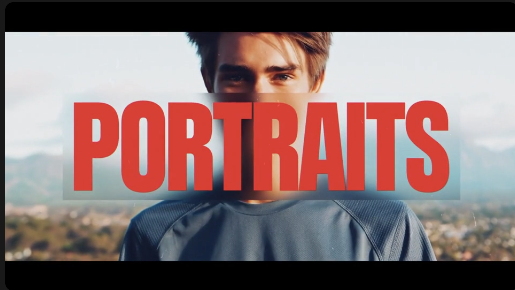
Free Portrait Transitions is a creative video transition template designed to help editors create smooth, engaging, and visually appealing vertical videos. Ideal for portrait-oriented photographs and video footage, this Free After Effects template is suitable for Instagram Reels, YouTube Shorts, TikTok videos, mobile advertisements, travel edits, fashion content, and social media storytelling. It helps connect multiple clips and images while maintaining a consistent visual flow throughout your project.
Vertical video has become an important format for social media creators, influencers, brands, photographers, and digital marketers. Free Portrait Transitions makes it easier to create dynamic edits that keep viewers engaged while showcasing portrait photographs, lifestyle moments, product visuals, and cinematic footage. Whether you are editing personal memories or professional promotional content, these transitions can add movement and creativity to your video presentation.
This Free After Effects transition template is particularly useful for portrait photography slideshows, fashion films, wedding videos, travel montages, beauty content, lifestyle edits, and creative portfolios. Combine multiple photographs or video clips to build a visually connected sequence with stylish transitions between scenes. Use it to present different moments, locations, outfits, products, or people in a polished vertical format.
Social media creators can use Free Portrait Transitions to produce engaging Instagram Reels, TikTok videos, YouTube Shorts, Facebook Reels, and other mobile-first content. Create daily vlogs, outfit transitions, travel diaries, transformation videos, photo dumps, event highlights, and personal storytelling edits. Well-timed transitions can improve the rhythm of your video and help maintain audience attention from one shot to the next.
Photographers and videographers can incorporate Free Portrait Transitions into portrait photo presentations, wedding highlights, pre-wedding films, birthday videos, anniversary montages, and event recaps. Showcase individual portraits, candid moments, group photographs, and special memories in a creative sequence. Pair the transitions with suitable music and carefully selected footage to produce an attractive slideshow or short-form film.
Brands and businesses can also use Free Portrait Transitions for product promotions, fashion campaigns, beauty advertisements, influencer collaborations, and social media marketing. Present product images, model portraits, promotional visuals, customer experiences, and campaign messages in a vertical video format designed for mobile screens. The transitions can help create a more dynamic presentation for advertisements, launches, and promotional announcements.
Customization allows you to adapt Free Portrait Transitions to the visual style of your project. Using Adobe After Effects, you can incorporate your own portrait images and video clips, arrange scenes, adjust timing, and combine the transitions with text, logos, colors, music, and other motion graphics. Available controls and customization options may vary depending on the original template, so check its specifications before using it in your editing workflow.
Freelance video editors, motion designers, social media managers, and creative agencies can use this Free transition template as a starting point for different types of client projects. It can help streamline the editing process when producing recurring social media content, promotional Reels, portrait slideshows, fashion edits, and short video advertisements. Instead of building every transition from scratch, editors can focus more on selecting footage, refining the pacing, and developing the overall visual story.
For the best results, use portrait footage with consistent framing and appropriate composition. Match transition timing to the rhythm of your soundtrack, maintain a clear visual direction, and avoid using too many competing effects in a single sequence. Combining Free Portrait Transitions with color grading, subtle sound effects, animated typography, and well-selected music can help create a cohesive and professional-looking final video.
Free Portrait Transitions is suitable for beginners who want to improve their video editing skills as well as experienced editors looking for creative assets for vertical content production. It can be used for personal projects, social media campaigns, portfolio presentations, client deliverables, and digital marketing videos. Before downloading, review the original asset details for supported After Effects versions, included files, and any project-specific requirements.
Whether you are creating Instagram Reels, YouTube Shorts, fashion videos, wedding highlights, travel montages, portrait slideshows, or product promotions, Free Portrait Transitions provides a useful starting point for connecting vertical photographs and video clips with creative motion. Explore more Free video editing templates, transitions, and motion graphics resources on Freevideofx to find assets for your next project.
Vertical video has become an important format for social media creators, influencers, brands, photographers, and digital marketers. Free Portrait Transitions makes it easier to create dynamic edits that keep viewers engaged while showcasing portrait photographs, lifestyle moments, product visuals, and cinematic footage. Whether you are editing personal memories or professional promotional content, these transitions can add movement and creativity to your video presentation.
This Free After Effects transition template is particularly useful for portrait photography slideshows, fashion films, wedding videos, travel montages, beauty content, lifestyle edits, and creative portfolios. Combine multiple photographs or video clips to build a visually connected sequence with stylish transitions between scenes. Use it to present different moments, locations, outfits, products, or people in a polished vertical format.
Social media creators can use Free Portrait Transitions to produce engaging Instagram Reels, TikTok videos, YouTube Shorts, Facebook Reels, and other mobile-first content. Create daily vlogs, outfit transitions, travel diaries, transformation videos, photo dumps, event highlights, and personal storytelling edits. Well-timed transitions can improve the rhythm of your video and help maintain audience attention from one shot to the next.
Photographers and videographers can incorporate Free Portrait Transitions into portrait photo presentations, wedding highlights, pre-wedding films, birthday videos, anniversary montages, and event recaps. Showcase individual portraits, candid moments, group photographs, and special memories in a creative sequence. Pair the transitions with suitable music and carefully selected footage to produce an attractive slideshow or short-form film.
Brands and businesses can also use Free Portrait Transitions for product promotions, fashion campaigns, beauty advertisements, influencer collaborations, and social media marketing. Present product images, model portraits, promotional visuals, customer experiences, and campaign messages in a vertical video format designed for mobile screens. The transitions can help create a more dynamic presentation for advertisements, launches, and promotional announcements.
Customization allows you to adapt Free Portrait Transitions to the visual style of your project. Using Adobe After Effects, you can incorporate your own portrait images and video clips, arrange scenes, adjust timing, and combine the transitions with text, logos, colors, music, and other motion graphics. Available controls and customization options may vary depending on the original template, so check its specifications before using it in your editing workflow.
Freelance video editors, motion designers, social media managers, and creative agencies can use this Free transition template as a starting point for different types of client projects. It can help streamline the editing process when producing recurring social media content, promotional Reels, portrait slideshows, fashion edits, and short video advertisements. Instead of building every transition from scratch, editors can focus more on selecting footage, refining the pacing, and developing the overall visual story.
For the best results, use portrait footage with consistent framing and appropriate composition. Match transition timing to the rhythm of your soundtrack, maintain a clear visual direction, and avoid using too many competing effects in a single sequence. Combining Free Portrait Transitions with color grading, subtle sound effects, animated typography, and well-selected music can help create a cohesive and professional-looking final video.
Free Portrait Transitions is suitable for beginners who want to improve their video editing skills as well as experienced editors looking for creative assets for vertical content production. It can be used for personal projects, social media campaigns, portfolio presentations, client deliverables, and digital marketing videos. Before downloading, review the original asset details for supported After Effects versions, included files, and any project-specific requirements.
Whether you are creating Instagram Reels, YouTube Shorts, fashion videos, wedding highlights, travel montages, portrait slideshows, or product promotions, Free Portrait Transitions provides a useful starting point for connecting vertical photographs and video clips with creative motion. Explore more Free video editing templates, transitions, and motion graphics resources on Freevideofx to find assets for your next project.


