

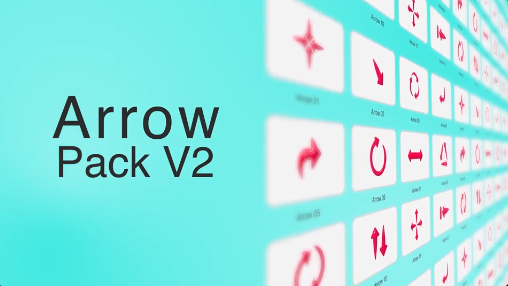
Free Arrow Pack V2 is a versatile After Effects motion graphics pack designed for creating dynamic arrow animations, directional graphics, callouts, highlights, and visual indicators. This Free pack provides useful animated elements that can help guide viewers' attention and make video content more informative and engaging.
Use Free Arrow Pack V2 for YouTube videos, social media content, presentations, tutorials, explainer videos, advertisements, promotional videos, educational content, product demonstrations, and creative video projects. Animated arrows can be used to point toward objects, highlight important details, indicate movement, or direct viewers through a visual sequence.
This Free After Effects graphics pack is suitable for video editors, motion designers, content creators, filmmakers, educators, marketers, freelancers, agencies, and businesses. The versatile nature of arrow graphics makes them useful across many different video styles and industries.
Create directional indicators, animated callouts, pointing graphics, movement guides, location markers, highlight effects, and visual annotations with Free Arrow Pack V2. These elements can be placed over video footage, photographs, screenshots, presentations, maps, product demonstrations, and other visual content.
The Free Arrow Pack can be particularly useful for tutorial and educational videos. Use animated arrows to point toward buttons, tools, objects, interface elements, construction details, diagrams, products, or important information that viewers need to notice.
Customize the Free elements to match your project by adapting their placement, timing, scale, and visual presentation. Combine the arrows with your own typography, colors, logos, footage, images, shapes, and other motion graphics to create a consistent visual style.
Free Arrow Pack V2 is also useful for social media creators who want to make their videos more engaging. Add animated arrows to Instagram Reels, TikTok videos, YouTube Shorts, Facebook content, product showcases, reaction videos, tutorials, and promotional posts to guide audience attention.
Adobe After Effects users can integrate the Free Arrow Graphics Pack into existing projects alongside transitions, text animations, icons, callouts, shapes, video footage, music, and sound effects. This makes it a practical addition to a motion graphics library for everyday editing and design work.
Freelancers, agencies, editors, educators, and creative professionals can use Free Arrow Pack V2 for personal projects, client work, commercial videos, presentations, explainer content, advertisements, and digital campaigns. The graphics can help add clarity and visual direction without requiring complex animation from scratch.
Whether you are creating a tutorial, explainer video, product demonstration, presentation, social media Reel, advertisement, or educational project, Free Arrow Pack V2 provides a flexible collection of animated arrow graphics for highlighting information and directing viewer attention in Adobe After Effects.
Use Free Arrow Pack V2 for YouTube videos, social media content, presentations, tutorials, explainer videos, advertisements, promotional videos, educational content, product demonstrations, and creative video projects. Animated arrows can be used to point toward objects, highlight important details, indicate movement, or direct viewers through a visual sequence.
This Free After Effects graphics pack is suitable for video editors, motion designers, content creators, filmmakers, educators, marketers, freelancers, agencies, and businesses. The versatile nature of arrow graphics makes them useful across many different video styles and industries.
Create directional indicators, animated callouts, pointing graphics, movement guides, location markers, highlight effects, and visual annotations with Free Arrow Pack V2. These elements can be placed over video footage, photographs, screenshots, presentations, maps, product demonstrations, and other visual content.
The Free Arrow Pack can be particularly useful for tutorial and educational videos. Use animated arrows to point toward buttons, tools, objects, interface elements, construction details, diagrams, products, or important information that viewers need to notice.
Customize the Free elements to match your project by adapting their placement, timing, scale, and visual presentation. Combine the arrows with your own typography, colors, logos, footage, images, shapes, and other motion graphics to create a consistent visual style.
Free Arrow Pack V2 is also useful for social media creators who want to make their videos more engaging. Add animated arrows to Instagram Reels, TikTok videos, YouTube Shorts, Facebook content, product showcases, reaction videos, tutorials, and promotional posts to guide audience attention.
Adobe After Effects users can integrate the Free Arrow Graphics Pack into existing projects alongside transitions, text animations, icons, callouts, shapes, video footage, music, and sound effects. This makes it a practical addition to a motion graphics library for everyday editing and design work.
Freelancers, agencies, editors, educators, and creative professionals can use Free Arrow Pack V2 for personal projects, client work, commercial videos, presentations, explainer content, advertisements, and digital campaigns. The graphics can help add clarity and visual direction without requiring complex animation from scratch.
Whether you are creating a tutorial, explainer video, product demonstration, presentation, social media Reel, advertisement, or educational project, Free Arrow Pack V2 provides a flexible collection of animated arrow graphics for highlighting information and directing viewer attention in Adobe After Effects.


