

Free HUD Call Outs for Premiere Pro is a professional collection of futuristic callout graphics designed to help video editors highlight important objects, people, locations, products, features, and information directly within their video footage. These animated HUD-style elements are useful for creating modern, technology-inspired visual presentations in Adobe Premiere Pro.
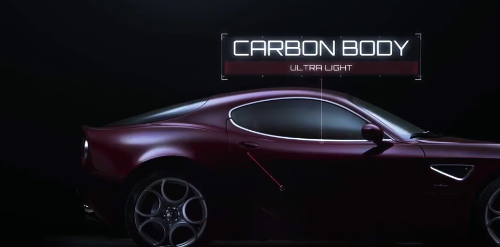
HUD callouts can make videos more informative by drawing attention to specific details on screen. Instead of relying only on traditional text overlays, editors can use animated lines, labels, markers, and interface-inspired graphics to visually connect information with the subject being highlighted.
The Free HUD Call Outs collection is suitable for technology videos, product demonstrations, tutorials, documentaries, promotional content, presentations, cinematic projects, science videos, automotive edits, gaming content, and other projects that benefit from an advanced digital visual style.
YouTube creators can use these Premiere Pro HUD callouts for tutorials, reviews, technology content, gaming videos, educational videos, product analysis, how-to content, and explainer videos. Callout graphics can help identify specific features or provide additional information without interrupting the main footage.
For social media content, the Free HUD Call Outs can add a futuristic visual layer to Instagram, TikTok, Facebook, and other short-form videos. They can be used to emphasize products, locations, people, statistics, features, or important moments while giving the video a more dynamic presentation.
Technology and software brands can use HUD-style callouts in product presentations, advertisements, promotional videos, feature demonstrations, launch videos, and digital campaigns. The futuristic interface-inspired design can complement modern technology-focused branding and visual communication.
Automotive filmmakers and creators can use callout graphics to highlight vehicle features, engine components, design details, performance information, interior elements, and other visual details. The graphics can work particularly well with cinematic car footage and technical presentations.
The Free HUD Call Outs are also useful for documentaries, science videos, educational content, and investigative-style productions. Editors can use visual markers and labels to guide the viewer's attention toward specific objects or areas within a scene.
Gaming and esports creators can incorporate futuristic callouts into gameplay videos, character showcases, equipment reviews, strategy content, highlight reels, and gaming trailers. HUD-inspired graphics can complement digital and futuristic gaming aesthetics.
Editors can customize the callout elements to suit their projects by adjusting text, positioning, timing, colors, typography, and other available visual properties. This makes it easier to integrate the graphics naturally with different footage, branding styles, and editing workflows.
Freelancers, motion designers, agencies, and professional video editors can use these Free HUD Call Outs as reusable graphics within Premiere Pro projects. They can provide a convenient foundation for creating client presentations, promotional videos, technical explainers, product videos, and social media content.
Whether you're creating technology videos, product demonstrations, automotive content, gaming videos, documentaries, tutorials, promotional campaigns, or futuristic cinematic edits, Free HUD Call Outs for Premiere Pro can help highlight important visual information and give your videos a polished, modern, technology-inspired look.
HUD callouts can make videos more informative by drawing attention to specific details on screen. Instead of relying only on traditional text overlays, editors can use animated lines, labels, markers, and interface-inspired graphics to visually connect information with the subject being highlighted.
The Free HUD Call Outs collection is suitable for technology videos, product demonstrations, tutorials, documentaries, promotional content, presentations, cinematic projects, science videos, automotive edits, gaming content, and other projects that benefit from an advanced digital visual style.
YouTube creators can use these Premiere Pro HUD callouts for tutorials, reviews, technology content, gaming videos, educational videos, product analysis, how-to content, and explainer videos. Callout graphics can help identify specific features or provide additional information without interrupting the main footage.
For social media content, the Free HUD Call Outs can add a futuristic visual layer to Instagram, TikTok, Facebook, and other short-form videos. They can be used to emphasize products, locations, people, statistics, features, or important moments while giving the video a more dynamic presentation.
Technology and software brands can use HUD-style callouts in product presentations, advertisements, promotional videos, feature demonstrations, launch videos, and digital campaigns. The futuristic interface-inspired design can complement modern technology-focused branding and visual communication.
Automotive filmmakers and creators can use callout graphics to highlight vehicle features, engine components, design details, performance information, interior elements, and other visual details. The graphics can work particularly well with cinematic car footage and technical presentations.
The Free HUD Call Outs are also useful for documentaries, science videos, educational content, and investigative-style productions. Editors can use visual markers and labels to guide the viewer's attention toward specific objects or areas within a scene.
Gaming and esports creators can incorporate futuristic callouts into gameplay videos, character showcases, equipment reviews, strategy content, highlight reels, and gaming trailers. HUD-inspired graphics can complement digital and futuristic gaming aesthetics.
Editors can customize the callout elements to suit their projects by adjusting text, positioning, timing, colors, typography, and other available visual properties. This makes it easier to integrate the graphics naturally with different footage, branding styles, and editing workflows.
Freelancers, motion designers, agencies, and professional video editors can use these Free HUD Call Outs as reusable graphics within Premiere Pro projects. They can provide a convenient foundation for creating client presentations, promotional videos, technical explainers, product videos, and social media content.
Whether you're creating technology videos, product demonstrations, automotive content, gaming videos, documentaries, tutorials, promotional campaigns, or futuristic cinematic edits, Free HUD Call Outs for Premiere Pro can help highlight important visual information and give your videos a polished, modern, technology-inspired look.


