

Make a memorable first impression with this Free Intro Opener After Effects Template. A well-crafted intro sets the tone for your video, introduces your subject, and gives your content a consistent visual identity. Whether you are creating a YouTube video, business presentation, promotional campaign, event teaser, or cinematic production, an engaging opener can make your project look more polished and professional.
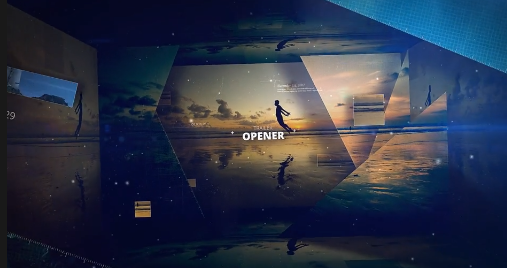
This Free Intro Opener provides a creative starting point for building an attractive opening sequence. Depending on the original project, it may feature animated titles, dynamic transitions, visual effects, motion graphics, or editable placeholders for your own content. Customize the available elements to match your brand, project theme, or storytelling style.
For social media publishing, prepare the appropriate landscape, square, or vertical format. Always preview your final render to check text visibility, animation timing, and visual quality.
Explore more Free After Effects templates, cinematic openers, logo animations, title sequences, and motion graphics on Freevideofx. Find creative resources to simplify your editing workflow and make every video introduction count.
This Free Intro Opener provides a creative starting point for building an attractive opening sequence. Depending on the original project, it may feature animated titles, dynamic transitions, visual effects, motion graphics, or editable placeholders for your own content. Customize the available elements to match your brand, project theme, or storytelling style.
Ideal for Different Video Projects
Use this Free opener for a wide range of creative and professional applications:- YouTube channel intros and branded video series.
- Corporate presentations and company profiles.
- Product launches and promotional advertisements.
- Event announcements and highlight videos.
- Cinematic projects and short films.
- Gaming videos and content introductions.
- Photography and videography showreels.
- Social media campaigns and marketing videos.
Customization and Editing Guide
This template is intended for Adobe After Effects. Before editing, check the original project file and software version requirements.- Open the downloaded project in a compatible version of After Effects.
- Explore the project compositions and locate editable sections.
- Replace placeholder text with your own titles and messages.
- Import your logo, images, or footage wherever supported.
- Adjust available colours and design elements to match your visual identity.
- Preview the animation and refine the timing if required.
- Render the final video in a suitable resolution and format.
Perfect for Social Media and Digital Branding
Give your content a consistent opening across popular platforms:- YouTube: Introduce tutorials, vlogs, reviews, and video series.
- Instagram: Create engaging introductions for Reels and promotional videos.
- Facebook: Improve branded content and advertising campaigns.
- LinkedIn: Present corporate videos and professional announcements.
- TikTok: Create attention-grabbing openings for short-form content.
- Websites: Add branded introductions to promotional and presentation videos.
Tips for a Professional Intro
Keep your intro concise and make sure it connects naturally with the main video. Choose readable typography, use consistent brand colours, and avoid unnecessary visual clutter. High-quality logos and footage can also improve the overall presentation.For social media publishing, prepare the appropriate landscape, square, or vertical format. Always preview your final render to check text visibility, animation timing, and visual quality.
Download Free Intro Opener Template
Enhance your next video project with this Free Intro Opener After Effects Template. It provides a convenient starting point for creating engaging introductions for personal, commercial, and creative productions.Explore more Free After Effects templates, cinematic openers, logo animations, title sequences, and motion graphics on Freevideofx. Find creative resources to simplify your editing workflow and make every video introduction count.


