

Free Kinetic Text Overlays is a dynamic typography resource designed for video editors, motion designers, filmmakers, and content creators who want to make their videos more engaging with animated text. Kinetic typography combines text, movement, timing, and visual composition to communicate messages in a creative and impactful way. This Free After Effects template is suitable for promotional videos, music edits, social media content, cinematic sequences, advertisements, and creative storytelling projects.
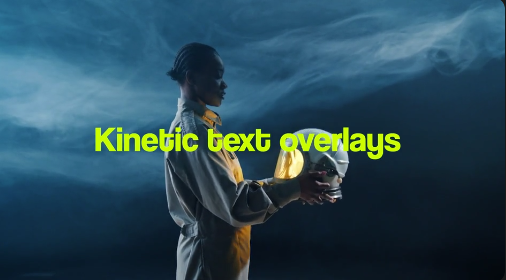
Animated text overlays can help emphasize important information, communicate ideas quickly, and guide viewers through a video. With Free Kinetic Text Overlays, you can incorporate expressive typography into your footage to highlight key phrases, introduce topics, display quotes, present headlines, and reinforce your message. The movement of the text can add energy to a composition while creating a stronger connection between the visuals and the content.
This Free After Effects text animation resource is ideal for YouTube videos, Instagram Reels, TikTok videos, YouTube Shorts, Facebook Reels, and other digital platforms. Use kinetic typography to create engaging introductions, motivational edits, educational videos, tutorials, product promotions, travel montages, and lifestyle content. Animated text can help make short-form videos more visually interesting while keeping important messages prominent on screen.
Content creators can use Free Kinetic Text Overlays to emphasize spoken words, highlight important moments, and reinforce narration. Add animated text to interviews, video essays, documentaries, explainer videos, presentations, and storytelling projects. When the typography is synchronized with speech or music, it can improve the rhythm of the edit and help viewers follow the central message.
Music video editors can incorporate Free kinetic text overlays into lyric videos, promotional teasers, artist introductions, album announcements, and performance edits. Combine expressive text movement with rhythmic cuts, colorful backgrounds, visual effects, and sound design to create an energetic presentation. The typography can also complement electronic music visuals, fashion films, experimental videos, and creative montage sequences.
Brands and businesses can use Free Kinetic Text Overlays for marketing campaigns, product advertisements, promotional videos, and branded social media content. Display product benefits, campaign headlines, promotional offers, brand statements, and calls to action through animated typography. This approach can help communicate information clearly while giving advertisements and promotional videos a more dynamic visual identity.
Customization allows you to adapt the Free After Effects template to your creative requirements. Depending on the original asset's available controls, you may be able to replace text, adjust colors, change animation timing, modify positioning, and coordinate the overlays with your footage. Combine the typography with your own logos, video clips, photographs, music, transitions, and sound effects to create a consistent visual presentation. Check the original template specifications for supported After Effects versions and included features.
Freelance video editors, motion designers, social media managers, and creative agencies can use Free Kinetic Text Overlays as a starting point for personal projects and client productions. Ready-made text animations can help streamline the creation of social media videos, advertisements, promotional content, title sequences, and branded presentations. Editors can focus on storytelling, pacing, and visual direction while adapting the typography to each project's requirements.
For the best results, choose fonts that suit your content, maintain strong contrast between the text and background, and ensure that animations remain readable at the intended playback speed. Match the movement of the typography to the rhythm of the soundtrack or narration, and use different animation styles thoughtfully to maintain visual consistency. Combining Free Kinetic Text Overlays with subtle sound effects, balanced color grading, and well-composed footage can create a polished final result.
Free Kinetic Text Overlays is suitable for beginners exploring motion graphics as well as experienced editors looking to expand their collection of typography resources. It can support personal videos, creative portfolios, social media campaigns, commercial advertisements, educational content, and professional client projects. Review the original asset details before downloading to confirm compatibility, installation requirements, and customization options.
Whether you are producing a motivational Reel, an engaging YouTube video, a music edit, a product advertisement, an explainer video, or a cinematic title sequence, Free Kinetic Text Overlays provides a creative starting point for adding expressive animated typography to your content. Explore more Free After Effects templates, text animations, typography effects, and motion graphics resources on Freevideofx to discover assets for your next video project.
Animated text overlays can help emphasize important information, communicate ideas quickly, and guide viewers through a video. With Free Kinetic Text Overlays, you can incorporate expressive typography into your footage to highlight key phrases, introduce topics, display quotes, present headlines, and reinforce your message. The movement of the text can add energy to a composition while creating a stronger connection between the visuals and the content.
This Free After Effects text animation resource is ideal for YouTube videos, Instagram Reels, TikTok videos, YouTube Shorts, Facebook Reels, and other digital platforms. Use kinetic typography to create engaging introductions, motivational edits, educational videos, tutorials, product promotions, travel montages, and lifestyle content. Animated text can help make short-form videos more visually interesting while keeping important messages prominent on screen.
Content creators can use Free Kinetic Text Overlays to emphasize spoken words, highlight important moments, and reinforce narration. Add animated text to interviews, video essays, documentaries, explainer videos, presentations, and storytelling projects. When the typography is synchronized with speech or music, it can improve the rhythm of the edit and help viewers follow the central message.
Music video editors can incorporate Free kinetic text overlays into lyric videos, promotional teasers, artist introductions, album announcements, and performance edits. Combine expressive text movement with rhythmic cuts, colorful backgrounds, visual effects, and sound design to create an energetic presentation. The typography can also complement electronic music visuals, fashion films, experimental videos, and creative montage sequences.
Brands and businesses can use Free Kinetic Text Overlays for marketing campaigns, product advertisements, promotional videos, and branded social media content. Display product benefits, campaign headlines, promotional offers, brand statements, and calls to action through animated typography. This approach can help communicate information clearly while giving advertisements and promotional videos a more dynamic visual identity.
Customization allows you to adapt the Free After Effects template to your creative requirements. Depending on the original asset's available controls, you may be able to replace text, adjust colors, change animation timing, modify positioning, and coordinate the overlays with your footage. Combine the typography with your own logos, video clips, photographs, music, transitions, and sound effects to create a consistent visual presentation. Check the original template specifications for supported After Effects versions and included features.
Freelance video editors, motion designers, social media managers, and creative agencies can use Free Kinetic Text Overlays as a starting point for personal projects and client productions. Ready-made text animations can help streamline the creation of social media videos, advertisements, promotional content, title sequences, and branded presentations. Editors can focus on storytelling, pacing, and visual direction while adapting the typography to each project's requirements.
For the best results, choose fonts that suit your content, maintain strong contrast between the text and background, and ensure that animations remain readable at the intended playback speed. Match the movement of the typography to the rhythm of the soundtrack or narration, and use different animation styles thoughtfully to maintain visual consistency. Combining Free Kinetic Text Overlays with subtle sound effects, balanced color grading, and well-composed footage can create a polished final result.
Free Kinetic Text Overlays is suitable for beginners exploring motion graphics as well as experienced editors looking to expand their collection of typography resources. It can support personal videos, creative portfolios, social media campaigns, commercial advertisements, educational content, and professional client projects. Review the original asset details before downloading to confirm compatibility, installation requirements, and customization options.
Whether you are producing a motivational Reel, an engaging YouTube video, a music edit, a product advertisement, an explainer video, or a cinematic title sequence, Free Kinetic Text Overlays provides a creative starting point for adding expressive animated typography to your content. Explore more Free After Effects templates, text animations, typography effects, and motion graphics resources on Freevideofx to discover assets for your next video project.


