

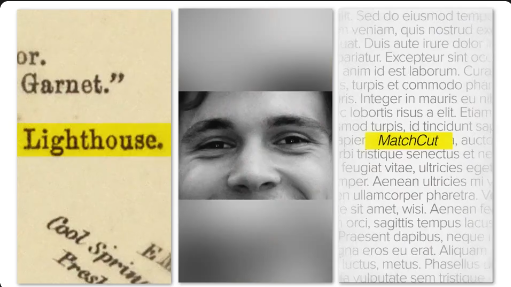
Create smooth, creative, and visually engaging video transitions with the Free Match Cut Effect. Match cutting is a popular filmmaking and video editing technique that connects two different shots through similar visual elements, movements, shapes, colours, or compositions. It helps create seamless scene changes while making video storytelling more interesting and dynamic.
Whether you are editing cinematic videos, travel films, music videos, product advertisements, YouTube content, or Instagram Reels, match cuts can help you create professional-looking transitions that capture your audience's attention.
This Free Match Cut resource provides a convenient starting point for video editors, filmmakers, motion graphics designers, and content creators who want to experiment with creative scene transitions.
For example, a circular object in one scene can transition into a similar circular shape in the next scene. Similarly, matching camera movements, subject positions, colours, or actions can create a smooth visual connection between two completely different environments.
This technique is frequently used in filmmaking, commercials, music videos, and modern social media content.
Depending on the original asset's features, the Free Match Cut resource may include transition elements, animated compositions, presets, or project files that help simplify the editing process.
You can use this editing technique in:
Key benefits include:
It is particularly helpful for creators producing cinematic edits, travel videos, fashion content, music videos, product advertisements, and short-form social media content.
Discover more Free video effects, transitions, After Effects templates, Premiere Pro resources, motion graphics, stock footage, and creative assets on Freevideofx to enhance your video editing workflow.
Whether you are editing cinematic videos, travel films, music videos, product advertisements, YouTube content, or Instagram Reels, match cuts can help you create professional-looking transitions that capture your audience's attention.
This Free Match Cut resource provides a convenient starting point for video editors, filmmakers, motion graphics designers, and content creators who want to experiment with creative scene transitions.
What Is a Match Cut Transition?
A match cut is a creative editing technique in which one shot transitions into another through a shared visual or conceptual element.For example, a circular object in one scene can transition into a similar circular shape in the next scene. Similarly, matching camera movements, subject positions, colours, or actions can create a smooth visual connection between two completely different environments.
This technique is frequently used in filmmaking, commercials, music videos, and modern social media content.
Depending on the original asset's features, the Free Match Cut resource may include transition elements, animated compositions, presets, or project files that help simplify the editing process.
Different Types of Match Cut Transitions
Match cuts can be created using different visual techniques:- Shape Match Cut: Connect two scenes through similar geometric shapes or objects.
- Movement Match Cut: Match the movement of a subject or camera between different shots.
- Action Match Cut: Connect two scenes through similar actions or gestures.
- Colour Match Cut: Transition between shots using matching colours or visual tones.
- Composition Match Cut: Align objects or subjects in similar positions across two scenes.
- Graphic Match Cut: Connect different visuals through similar graphic elements or patterns.
Where Can You Use This Free Match Cut Effect?
The Free Match Cut Transition can be useful for several creative and professional applications:- Cinematic Videos: Connect scenes through visually related compositions.
- Travel Videos: Transition between different destinations and landscapes.
- Instagram Reels: Create engaging transitions for short-form content.
- Music Videos: Synchronize scene changes with music and rhythm.
- Fashion Videos: Connect different outfits, models, and locations.
- Product Advertisements: Transition between product angles and promotional shots.
- YouTube Videos: Create dynamic scene changes and visual storytelling.
- Wedding Videos: Connect memorable moments through matching movements.
- Documentary Films: Transition between related scenes and storytelling sequences.
Perfect for Social Media and Digital Video Projects
Match cuts are especially effective in short-form content because they create visual connections that encourage viewers to keep watching.You can use this editing technique in:
- Instagram Reels and Stories
- YouTube Shorts
- Facebook Reels
- Travel and lifestyle videos
- Cinematic montages
- Product promotional videos
- Fashion and photography edits
- Music videos
- Corporate advertisements
- Creative filmmaking projects
How to Create a Match Cut Transition
Follow these general steps to create your own match cut:- Choose Your Footage: Select two or more video clips that contain similar visual elements.
- Identify Matching Elements: Look for similar shapes, movements, colours, actions, or compositions.
- Arrange Your Clips: Place the selected footage on your editing timeline.
- Align the Visuals: Adjust the position, scale, and timing so the matching elements connect naturally.
- Create the Cut: Trim the clips at the appropriate frames to establish the transition.
- Refine the Timing: Adjust the cut to maintain smooth visual continuity.
- Add Supporting Effects: Use motion blur, sound effects, or additional transitions where appropriate.
- Preview the Result: Review the sequence at normal playback speed to check the transition.
- Export Your Video: Render the final project using suitable video settings.
Professional Tips for Better Match Cuts
- Plan matching shots before recording your footage.
- Look for similar shapes and compositions between scenes.
- Match camera movements for smoother transitions.
- Maintain consistent subject positioning.
- Use similar lighting and colour tones where possible.
- Keep the transition timing precise.
- Avoid unnecessary effects that distract from the visual connection.
- Synchronize the cut with background music when appropriate.
- Preview transitions multiple times to ensure natural continuity.
Benefits of Using Free Match Cut Transitions
Match cuts can improve the visual storytelling of your videos without requiring complicated transition effects. They provide a creative way to connect scenes and maintain audience engagement.Key benefits include:
- Creates visually interesting scene transitions.
- Improves storytelling and visual continuity.
- Adds a cinematic editing style.
- Helps connect unrelated scenes creatively.
- Makes social media videos more engaging.
- Supports different filmmaking and promotional projects.
- Encourages creative experimentation with footage.
Who Can Benefit from This Effect?
This Free Match Cut resource is useful for video editors, filmmakers, motion graphics designers, YouTubers, Instagram creators, freelancers, advertising agencies, wedding videographers, and digital marketing professionals.It is particularly helpful for creators producing cinematic edits, travel videos, fashion content, music videos, product advertisements, and short-form social media content.
Download Free Match Cut Effect from Freevideofx
Take your video editing skills to the next level with the Free Match Cut Transition Effect. Explore this creative resource on Freevideofx and experiment with visually connected scenes to create smooth transitions, cinematic edits, and engaging social media videos.Discover more Free video effects, transitions, After Effects templates, Premiere Pro resources, motion graphics, stock footage, and creative assets on Freevideofx to enhance your video editing workflow.


