

Celebrate special moments and make birthdays more memorable with a Free Photo Slideshow Happy Birthday Template from Freevideofx. Designed to bring favorite photographs together in a beautiful animated presentation, a birthday slideshow is a wonderful way to share memories, express heartfelt wishes, and celebrate someone special. With creative photo layouts, smooth transitions, animated text, and suitable background music, you can transform a collection of pictures into a personalized birthday video.
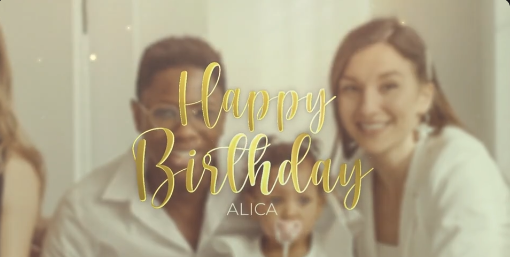
Whether you are preparing a surprise for a friend, creating a birthday video for your parents, celebrating your partner's special day, or putting together a memorable presentation for a family member, a birthday photo slideshow offers a meaningful way to express your feelings. Instead of sharing individual photographs, you can arrange them into a visual story that highlights special memories, happy moments, and important milestones.
With a Free Photo Slideshow Happy Birthday template, you can explore creative ways to celebrate birthdays without designing every scene from scratch. It is suitable for personal celebrations, social media posts, birthday parties, and customized greeting videos.
The slideshow can begin with a birthday greeting, continue with photographs from memorable occasions, and finish with a heartfelt wish or a special message. This structure helps create a natural flow and turns the video into more than a simple collection of pictures.
Birthday slideshows can be designed in different styles. Some feature bright colors and playful animations, while others use elegant layouts and gentle transitions for a more emotional presentation. The best style depends on the recipient's personality, the occasion, and the memories you want to share.
A Free Photo Slideshow Happy Birthday template helps beginners create personalized birthday videos while allowing experienced editors to work more efficiently. You can focus on selecting meaningful photographs, writing a personal message, and arranging the content to reflect the recipient's personality.
Freevideofx helps creators discover video editing resources, slideshow templates, photo animations, and motion graphics for different creative projects. Before using a particular birthday template, check its file format, software compatibility, customization options, and licensing terms.
Birthday-Themed Titles: Introduce the video with a Happy Birthday greeting and personalize supported text elements with the recipient's name.
Smooth Photo Transitions: Connect memorable pictures with transitions that create a continuous and engaging presentation.
Personalized Messages: Add birthday wishes, short captions, meaningful quotes, dates, and personal notes where the template supports editable text.
Celebration-Inspired Design: Depending on the template, decorative elements, colorful graphics, or festive animations may help establish a birthday atmosphere.
Music and Emotional Storytelling: Combine photographs with suitable background music to create a cheerful, romantic, sentimental, or playful mood.
Flexible Sharing Options: Prepare the finished slideshow for birthday parties, personal messages, social media, or digital greetings, depending on the composition and export settings.
The exact features depend on the individual template and the project files included with it.
Birthday Slideshow for Parents: Celebrate your parents with family photographs, childhood memories, important milestones, and a heartfelt message expressing your love and appreciation.
Birthday Video for Your Partner: Create a romantic presentation featuring special moments, memorable dates, trips, and photographs that reflect your relationship.
Birthday Celebration for Siblings: Use childhood photographs, family moments, and favorite memories to create a fun and meaningful birthday surprise.
Kids' Birthday Videos: Present photographs from different stages of a child's life with colorful visuals and cheerful music suitable for the celebration.
Milestone Birthdays: Create a special presentation for an 18th, 21st, 25th, 50th, or other milestone birthday using photographs that capture important stages of life.
Birthday Party Presentations: Display the slideshow on a screen during a birthday party so guests can enjoy memorable moments together.
Social Media Birthday Wishes: Share a personalized photo video through Instagram Reels, WhatsApp, Facebook, or other platforms using a suitable video format.
Family Birthday Montages: Combine photographs from relatives and friends into one collaborative presentation for a memorable group surprise.
Digital Birthday Greetings: Send an animated birthday slideshow as a thoughtful alternative to a simple text message or static greeting card.
Photographers and freelance video editors may also use suitable templates to create customized birthday videos for clients. Event organizers can incorporate photo slideshows into birthday parties, while beginners can use these projects to explore basic video editing and animation techniques.
The most meaningful birthday slideshow is not necessarily the one with the most effects. A thoughtful selection of photographs, personal messages, and memorable moments can make a simple presentation feel special.
1. Open the Project: Launch a compatible version of After Effects and open the supplied project file.
2. Locate the Photo Placeholders: Review the project panel and timeline to find the compositions or layers intended for image replacement.
3. Import Your Photographs: Select clear, high-quality pictures that represent memorable moments with the birthday person.
4. Replace the Sample Images: Insert your photographs into the appropriate placeholders or compositions according to the template instructions.
5. Personalize the Birthday Title: Replace the sample text with the recipient's name or a greeting such as "Happy Birthday" if the template supports text editing.
6. Add Personal Messages: Include short birthday wishes, meaningful captions, memorable dates, or a final message to make the presentation more personal.
7. Adjust Image Framing: Check the scale and position of each photograph to ensure that faces and important details remain visible.
8. Add Background Music: Choose music that matches the mood of the video. Make sure you have permission to use the selected track, especially if you plan to publish the video online.
9. Preview the Complete Slideshow: Check the photograph sequence, transitions, text readability, and timing before rendering.
10. Export the Video: Render the finished slideshow using settings appropriate for your intended platform and review the final file before sharing it.
These instructions apply to compatible After Effects projects. Other birthday slideshow assets may require different software or editing workflows.
Tell a Personal Story: Arrange photographs chronologically or group them into themes, such as childhood, family, friendships, travel, and recent memories.
Personalize the Greeting: Include the recipient's name and a genuine message that reflects your relationship with them.
Match the Music to the Mood: Cheerful music can create a festive atmosphere, while gentle instrumental music may suit a sentimental birthday tribute.
Keep the Text Readable: Use clear fonts, appropriate text sizes, and contrasting colors so that birthday messages remain easy to read.
Balance the Pacing: Allow enough time for viewers to appreciate each photograph. Give particularly meaningful moments a little more screen time.
Use Transitions Carefully: Choose effects that complement the photographs instead of distracting from the memories.
Maintain Good Image Quality: Use clear photographs and check that important subjects are not cropped or stretched.
End with a Memorable Message: Finish with a heartfelt birthday wish, a favorite photograph, or a short personal note.
Check the Final Video: Preview the slideshow from beginning to end to identify awkward transitions, text errors, or audio problems.
For Instagram Reels, consider creating a short sequence with an engaging opening, a selection of favorite photographs, and a clear birthday message at the end. For WhatsApp, a compact video can be a convenient way to send personal wishes directly to the birthday person or share the celebration with a family group.
For YouTube or birthday party presentations, you can create a longer slideshow featuring more photographs, captions, and personal messages. Choose the aspect ratio and video resolution according to the platform or screen where the video will be displayed.
When publishing birthday videos publicly, consider the privacy of the people featured and obtain permission when appropriate.
A suitable template can reduce repetitive design work and provide a consistent visual structure for personalized projects. Editors can focus on selecting photographs, arranging the story, and refining the presentation.
For commercial projects, review the template's license to confirm that the intended use is permitted.
By combining favorite pictures, personal messages, appropriate music, and thoughtful transitions, you can create a birthday video that feels unique to the person being celebrated. It might be funny and energetic, emotional and sentimental, or elegant and simple.
Focus on the memories that matter most. A few carefully chosen photographs and a sincere message can make a stronger impression than an overly complicated presentation.
Explore different slideshow styles and customize the available photographs, titles, and text elements to suit the recipient and occasion. Add meaningful memories and appropriate music to create a personal presentation that can be shared and treasured.
Explore the Free Photo Slideshow Happy Birthday Template on Freevideofx and turn your favorite photographs into a beautiful birthday celebration video. Share heartfelt wishes, revisit special memories, and make someone's special day even more memorable with a personalized photo slideshow.
Whether you are preparing a surprise for a friend, creating a birthday video for your parents, celebrating your partner's special day, or putting together a memorable presentation for a family member, a birthday photo slideshow offers a meaningful way to express your feelings. Instead of sharing individual photographs, you can arrange them into a visual story that highlights special memories, happy moments, and important milestones.
With a Free Photo Slideshow Happy Birthday template, you can explore creative ways to celebrate birthdays without designing every scene from scratch. It is suitable for personal celebrations, social media posts, birthday parties, and customized greeting videos.
What Is a Happy Birthday Photo Slideshow Template?
A Happy Birthday photo slideshow template is a pre-designed video project that combines photographs, animated scenes, text, and transitions to create a birthday-themed presentation. Depending on the original template, it may include birthday titles, decorative elements, photo placeholders, animated frames, colorful backgrounds, celebratory effects, and spaces for personalized messages.The slideshow can begin with a birthday greeting, continue with photographs from memorable occasions, and finish with a heartfelt wish or a special message. This structure helps create a natural flow and turns the video into more than a simple collection of pictures.
Birthday slideshows can be designed in different styles. Some feature bright colors and playful animations, while others use elegant layouts and gentle transitions for a more emotional presentation. The best style depends on the recipient's personality, the occasion, and the memories you want to share.
Why Choose a Free Happy Birthday Slideshow Template?
Creating a birthday video from scratch can involve arranging photographs, designing titles, adding transitions, animating images, and synchronizing the presentation with music. A ready-made template provides an existing structure that can simplify the editing process.A Free Photo Slideshow Happy Birthday template helps beginners create personalized birthday videos while allowing experienced editors to work more efficiently. You can focus on selecting meaningful photographs, writing a personal message, and arranging the content to reflect the recipient's personality.
Freevideofx helps creators discover video editing resources, slideshow templates, photo animations, and motion graphics for different creative projects. Before using a particular birthday template, check its file format, software compatibility, customization options, and licensing terms.
Key Features and Creative Possibilities
Animated Photo Presentation: Showcase favorite photographs through creative layouts and movement rather than displaying them as a basic image gallery.Birthday-Themed Titles: Introduce the video with a Happy Birthday greeting and personalize supported text elements with the recipient's name.
Smooth Photo Transitions: Connect memorable pictures with transitions that create a continuous and engaging presentation.
Personalized Messages: Add birthday wishes, short captions, meaningful quotes, dates, and personal notes where the template supports editable text.
Celebration-Inspired Design: Depending on the template, decorative elements, colorful graphics, or festive animations may help establish a birthday atmosphere.
Music and Emotional Storytelling: Combine photographs with suitable background music to create a cheerful, romantic, sentimental, or playful mood.
Flexible Sharing Options: Prepare the finished slideshow for birthday parties, personal messages, social media, or digital greetings, depending on the composition and export settings.
The exact features depend on the individual template and the project files included with it.
Best Uses for a Happy Birthday Photo Slideshow
Birthday Video for Friends: Combine funny photographs, memorable outings, celebrations, and shared experiences to create a personalized surprise for a close friend.Birthday Slideshow for Parents: Celebrate your parents with family photographs, childhood memories, important milestones, and a heartfelt message expressing your love and appreciation.
Birthday Video for Your Partner: Create a romantic presentation featuring special moments, memorable dates, trips, and photographs that reflect your relationship.
Birthday Celebration for Siblings: Use childhood photographs, family moments, and favorite memories to create a fun and meaningful birthday surprise.
Kids' Birthday Videos: Present photographs from different stages of a child's life with colorful visuals and cheerful music suitable for the celebration.
Milestone Birthdays: Create a special presentation for an 18th, 21st, 25th, 50th, or other milestone birthday using photographs that capture important stages of life.
Birthday Party Presentations: Display the slideshow on a screen during a birthday party so guests can enjoy memorable moments together.
Social Media Birthday Wishes: Share a personalized photo video through Instagram Reels, WhatsApp, Facebook, or other platforms using a suitable video format.
Family Birthday Montages: Combine photographs from relatives and friends into one collaborative presentation for a memorable group surprise.
Digital Birthday Greetings: Send an animated birthday slideshow as a thoughtful alternative to a simple text message or static greeting card.
Ideal for Families, Friends, and Content Creators
Free Photo Slideshow Happy Birthday templates can be useful for anyone who wants to create a personalized birthday video. Families can prepare memorable presentations for loved ones, friends can organize photographs into a surprise montage, and social media creators can produce birthday greeting content for different audiences.Photographers and freelance video editors may also use suitable templates to create customized birthday videos for clients. Event organizers can incorporate photo slideshows into birthday parties, while beginners can use these projects to explore basic video editing and animation techniques.
The most meaningful birthday slideshow is not necessarily the one with the most effects. A thoughtful selection of photographs, personal messages, and memorable moments can make a simple presentation feel special.
How to Customize a Birthday Photo Slideshow in After Effects
If the downloaded template includes an Adobe After Effects project, you can generally follow these steps to create your birthday video. The exact workflow depends on the original template's structure.1. Open the Project: Launch a compatible version of After Effects and open the supplied project file.
2. Locate the Photo Placeholders: Review the project panel and timeline to find the compositions or layers intended for image replacement.
3. Import Your Photographs: Select clear, high-quality pictures that represent memorable moments with the birthday person.
4. Replace the Sample Images: Insert your photographs into the appropriate placeholders or compositions according to the template instructions.
5. Personalize the Birthday Title: Replace the sample text with the recipient's name or a greeting such as "Happy Birthday" if the template supports text editing.
6. Add Personal Messages: Include short birthday wishes, meaningful captions, memorable dates, or a final message to make the presentation more personal.
7. Adjust Image Framing: Check the scale and position of each photograph to ensure that faces and important details remain visible.
8. Add Background Music: Choose music that matches the mood of the video. Make sure you have permission to use the selected track, especially if you plan to publish the video online.
9. Preview the Complete Slideshow: Check the photograph sequence, transitions, text readability, and timing before rendering.
10. Export the Video: Render the finished slideshow using settings appropriate for your intended platform and review the final file before sharing it.
These instructions apply to compatible After Effects projects. Other birthday slideshow assets may require different software or editing workflows.
Tips for Creating a Beautiful Birthday Slideshow
Choose Meaningful Photographs: Select pictures that capture important memories, funny moments, achievements, celebrations, and shared experiences.Tell a Personal Story: Arrange photographs chronologically or group them into themes, such as childhood, family, friendships, travel, and recent memories.
Personalize the Greeting: Include the recipient's name and a genuine message that reflects your relationship with them.
Match the Music to the Mood: Cheerful music can create a festive atmosphere, while gentle instrumental music may suit a sentimental birthday tribute.
Keep the Text Readable: Use clear fonts, appropriate text sizes, and contrasting colors so that birthday messages remain easy to read.
Balance the Pacing: Allow enough time for viewers to appreciate each photograph. Give particularly meaningful moments a little more screen time.
Use Transitions Carefully: Choose effects that complement the photographs instead of distracting from the memories.
Maintain Good Image Quality: Use clear photographs and check that important subjects are not cropped or stretched.
End with a Memorable Message: Finish with a heartfelt birthday wish, a favorite photograph, or a short personal note.
Check the Final Video: Preview the slideshow from beginning to end to identify awkward transitions, text errors, or audio problems.
Create Birthday Slideshow Videos for Social Media
Birthday photo slideshows are a popular way to share personalized wishes online. A carefully edited video can turn a collection of photographs into a memorable greeting that friends and family can watch and share.For Instagram Reels, consider creating a short sequence with an engaging opening, a selection of favorite photographs, and a clear birthday message at the end. For WhatsApp, a compact video can be a convenient way to send personal wishes directly to the birthday person or share the celebration with a family group.
For YouTube or birthday party presentations, you can create a longer slideshow featuring more photographs, captions, and personal messages. Choose the aspect ratio and video resolution according to the platform or screen where the video will be displayed.
When publishing birthday videos publicly, consider the privacy of the people featured and obtain permission when appropriate.
Benefits for Photographers and Freelance Video Editors
Birthday slideshow templates can also support professional creative work. Photographers can use them to present birthday event photographs, while freelance editors can create customized video greetings for clients. Event organizers may include a photo montage as part of a birthday celebration, and social media managers can prepare birthday content for brands or public-facing personalities.A suitable template can reduce repetitive design work and provide a consistent visual structure for personalized projects. Editors can focus on selecting photographs, arranging the story, and refining the presentation.
For commercial projects, review the template's license to confirm that the intended use is permitted.
Make Every Birthday More Memorable with Photo Storytelling
A birthday is an opportunity to celebrate someone's life, relationships, achievements, and experiences. Photographs help preserve these moments, while a slideshow brings them together into a story that can be enjoyed again and again.By combining favorite pictures, personal messages, appropriate music, and thoughtful transitions, you can create a birthday video that feels unique to the person being celebrated. It might be funny and energetic, emotional and sentimental, or elegant and simple.
Focus on the memories that matter most. A few carefully chosen photographs and a sincere message can make a stronger impression than an overly complicated presentation.
Discover Free Birthday Slideshow Templates on Freevideofx
Freevideofx helps creators explore photo slideshow templates, birthday video resources, photo animations, transitions, and other creative assets for video production. Whether you are planning a surprise for a friend, celebrating a family member, preparing a romantic birthday greeting, or creating a party presentation, a suitable template can help simplify your workflow.Explore different slideshow styles and customize the available photographs, titles, and text elements to suit the recipient and occasion. Add meaningful memories and appropriate music to create a personal presentation that can be shared and treasured.
Explore the Free Photo Slideshow Happy Birthday Template on Freevideofx and turn your favorite photographs into a beautiful birthday celebration video. Share heartfelt wishes, revisit special memories, and make someone's special day even more memorable with a personalized photo slideshow.


