

Create compelling, cinematic, and professional documentary videos with a Free The Documentary 3 Template from Freevideofx. Designed for creators who want to present real stories, historical events, interviews, research, and meaningful experiences, a documentary-style template can help establish a serious visual tone and guide viewers through a powerful narrative.
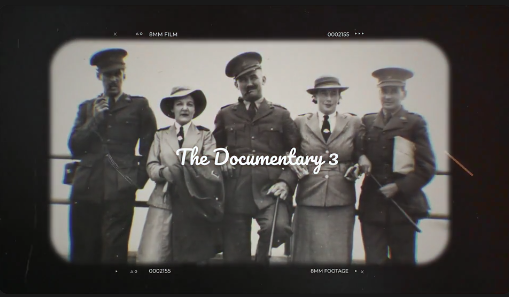
Documentary videos rely on strong storytelling, authentic visuals, carefully structured information, and thoughtful editing. A well-designed documentary template can support these elements through cinematic titles, image compositions, animated text, smooth transitions, and atmospheric visual presentation. Whether you are producing a historical documentary, investigative video, biographical film, educational project, travel documentary, or YouTube storytelling series, this type of template can help bring your footage together into a cohesive production.
With Free The Documentary 3 resources from Freevideofx, creators can explore documentary-inspired visual design and build a consistent presentation without creating every motion graphics element from scratch.
Documentary-inspired designs often emphasize readability, atmosphere, and storytelling rather than excessive visual effects. Images, headlines, dates, names, and supporting footage can work together to introduce a subject, provide context, and move the narrative forward.
This visual approach is suitable for factual storytelling, historical retrospectives, biographies, educational explainers, investigative content, and documentary-style social media videos. The exact features and editing options depend on the specific template and its included files.
A Free The Documentary 3 template provides a starting point for developing a consistent visual identity. It can help beginners explore documentary editing while giving experienced editors a framework for organizing titles, photographs, footage, and supporting information.
Freevideofx helps creators discover video editing resources, cinematic templates, transitions, and motion graphics for different production needs. Before using a particular asset, check its file format, supported software, customization options, and licensing conditions.
Animated Titles and Typography: Introduce the documentary's subject, chapters, locations, or important themes through title animation where supported.
Photo and Video Integration: Incorporate photographs, archival images, interviews, and footage into a cohesive visual sequence when the template provides suitable placeholders.
Structured Storytelling: Organize information into sections that help viewers understand the background, key events, and conclusions of a story.
Professional Visual Composition: Use consistent typography, image placement, and transitions to create a unified documentary presentation.
Flexible Creative Applications: Adapt the design for historical documentaries, biographies, travel films, educational videos, investigative content, and video essays.
Customizable Branding: Adjust supported titles, colors, and other editable elements to match your production style.
The actual features depend on the original template, its project structure, and the software used to edit it.
Biographical Films: Tell the story of a person's life, achievements, challenges, and influence through photographs, interviews, and supporting footage.
Investigative Videos: Introduce a subject, organize evidence, and present verified information in a clear and professional format.
Educational Documentaries: Explain scientific discoveries, social issues, cultural traditions, architecture, or other complex topics through structured visuals.
Travel Documentaries: Showcase destinations, landscapes, local culture, people, and experiences through cinematic footage and informative titles.
YouTube Documentary Videos: Build a recognizable presentation style for long-form storytelling, history channels, research-based videos, and documentary series.
Corporate Documentaries: Present company history, project development, community initiatives, organizational milestones, and professional case studies.
Social and Cultural Stories: Explore communities, traditions, everyday experiences, and social developments through interviews and contextual visuals.
Personal Documentary Projects: Create a visual record of a family history, personal journey, local event, or meaningful experience.
Independent filmmakers can use suitable templates to establish a consistent visual identity, while YouTube creators can develop a recognizable format for recurring documentary episodes. Educators may use documentary-style titles and visual layouts to present research, and businesses can incorporate these designs into corporate storytelling.
Freelance editors can also use a compatible template as a starting point for client projects. However, the final documentary should always be shaped around the story, available evidence, and intended audience rather than forcing the content to fit a particular visual effect.
1. Open the Project: Launch a compatible version of After Effects and open the supplied project file.
2. Review the Compositions: Examine the project panel and timeline to identify title sequences, image placeholders, footage areas, and other editable elements.
3. Replace Placeholder Text: Enter your documentary title, chapter names, dates, locations, or other relevant information in the designated text layers.
4. Import Your Media: Add suitable photographs, video footage, archival materials, and other visual assets to the project where the template supports them.
5. Adjust Image Framing: Position and scale your media carefully to preserve important subjects and maintain a balanced composition.
6. Customize the Visual Style: Adjust supported colors, typography, backgrounds, and other controls to align with the documentary's tone.
7. Refine the Timing: Preview the title animations and transitions to ensure they work with the pace of the narration and footage.
8. Add Audio: Integrate your edited narration, suitable background music, and sound design in your video-editing workflow as needed.
9. Review the Sequence: Check text readability, visual consistency, media quality, and the transitions between scenes.
10. Export the Final Video: Render the project using settings appropriate for your intended platform and review the exported video before publication.
These instructions apply to compatible After Effects projects. Other versions of the asset may require different software or workflows.
Use Accurate Information: Verify dates, quotations, names, statistics, and historical claims. Documentary visuals should support factual accuracy rather than create a misleading impression.
Prioritize Authentic Footage: Choose images and video that genuinely relate to the subject. When using archival or illustrative material, provide context where necessary.
Keep Titles Readable: Use clear typography and sufficient screen time so viewers can comfortably read names, dates, and chapter headings.
Maintain Visual Consistency: Apply a coherent style to titles, captions, transitions, and supporting graphics throughout the documentary.
Use Music Carefully: Background music can support emotion and pacing, but it should not overpower interviews, narration, or important natural sounds.
Avoid Unnecessary Effects: Documentary storytelling often benefits from restraint. Use transitions and animation to clarify the narrative rather than distract from it.
Respect Media Rights: Check permissions and licensing for photographs, archival footage, music, and other assets before including them in a public or commercial release.
Review the Entire Film: Watch the documentary from beginning to end to identify pacing issues, unclear transitions, missing context, or inconsistencies.
For a documentary about architecture or construction, for example, titles and image sequences can introduce a location, show the development of a project, and highlight key milestones. A historical documentary might use dates, maps, archival photographs, and chapter headings to help viewers follow events.
The key is to use motion graphics in support of the story. Clear information, meaningful visuals, and well-paced editing are more important than complicated animation.
Independent creators can use documentary templates to organize complex subjects into a visually consistent format, while freelancers may adapt suitable projects for client presentations and commissioned videos.
For commercial or client work, review the specific asset's license to ensure that your intended use is permitted.
Start by organizing the story into logical sections, then use the template's available elements to introduce topics and reinforce important information. Pay attention to pacing, readability, audio quality, and the relationship between visuals and narration.
When used thoughtfully, documentary-inspired motion graphics can help transform a collection of footage and research into a polished, coherent viewing experience.
Explore different documentary-inspired styles and select a design that complements your subject and storytelling approach. Customize the available elements to create a consistent presentation while keeping the facts, footage, and narrative at the center of the project.
Explore The Documentary 3 Template on Freevideofx and bring a cinematic visual style to your next documentary project. Combine meaningful footage, clear typography, and purposeful motion graphics to present your story in a compelling and professional way.
Documentary videos rely on strong storytelling, authentic visuals, carefully structured information, and thoughtful editing. A well-designed documentary template can support these elements through cinematic titles, image compositions, animated text, smooth transitions, and atmospheric visual presentation. Whether you are producing a historical documentary, investigative video, biographical film, educational project, travel documentary, or YouTube storytelling series, this type of template can help bring your footage together into a cohesive production.
With Free The Documentary 3 resources from Freevideofx, creators can explore documentary-inspired visual design and build a consistent presentation without creating every motion graphics element from scratch.
What Is The Documentary 3 Template?
The Documentary 3 template is a documentary-style video asset intended to help editors create a structured, cinematic presentation. Depending on the original project, it may include animated titles, photo and video placeholders, typography, transition effects, layered compositions, background elements, or opening and closing sequences.Documentary-inspired designs often emphasize readability, atmosphere, and storytelling rather than excessive visual effects. Images, headlines, dates, names, and supporting footage can work together to introduce a subject, provide context, and move the narrative forward.
This visual approach is suitable for factual storytelling, historical retrospectives, biographies, educational explainers, investigative content, and documentary-style social media videos. The exact features and editing options depend on the specific template and its included files.
Why Choose a Free Documentary Template?
Producing a documentary can require substantial planning, research, footage organization, editing, and visual design. Creating every title sequence and motion graphics element independently may add more work to an already demanding process.A Free The Documentary 3 template provides a starting point for developing a consistent visual identity. It can help beginners explore documentary editing while giving experienced editors a framework for organizing titles, photographs, footage, and supporting information.
Freevideofx helps creators discover video editing resources, cinematic templates, transitions, and motion graphics for different production needs. Before using a particular asset, check its file format, supported software, customization options, and licensing conditions.
Key Features and Creative Possibilities
Cinematic Documentary Presentation: Establish a serious, polished visual tone suitable for factual and narrative-driven videos.Animated Titles and Typography: Introduce the documentary's subject, chapters, locations, or important themes through title animation where supported.
Photo and Video Integration: Incorporate photographs, archival images, interviews, and footage into a cohesive visual sequence when the template provides suitable placeholders.
Structured Storytelling: Organize information into sections that help viewers understand the background, key events, and conclusions of a story.
Professional Visual Composition: Use consistent typography, image placement, and transitions to create a unified documentary presentation.
Flexible Creative Applications: Adapt the design for historical documentaries, biographies, travel films, educational videos, investigative content, and video essays.
Customizable Branding: Adjust supported titles, colors, and other editable elements to match your production style.
The actual features depend on the original template, its project structure, and the software used to edit it.
Best Uses for The Documentary 3 Template
Historical Documentaries: Present historical events, important dates, locations, archival photographs, and key figures in an organized visual narrative.Biographical Films: Tell the story of a person's life, achievements, challenges, and influence through photographs, interviews, and supporting footage.
Investigative Videos: Introduce a subject, organize evidence, and present verified information in a clear and professional format.
Educational Documentaries: Explain scientific discoveries, social issues, cultural traditions, architecture, or other complex topics through structured visuals.
Travel Documentaries: Showcase destinations, landscapes, local culture, people, and experiences through cinematic footage and informative titles.
YouTube Documentary Videos: Build a recognizable presentation style for long-form storytelling, history channels, research-based videos, and documentary series.
Corporate Documentaries: Present company history, project development, community initiatives, organizational milestones, and professional case studies.
Social and Cultural Stories: Explore communities, traditions, everyday experiences, and social developments through interviews and contextual visuals.
Personal Documentary Projects: Create a visual record of a family history, personal journey, local event, or meaningful experience.
Ideal for Filmmakers, Researchers, and Content Creators
Free documentary templates can be useful for independent filmmakers, YouTubers, educators, journalists, researchers, video editors, and production studios.Independent filmmakers can use suitable templates to establish a consistent visual identity, while YouTube creators can develop a recognizable format for recurring documentary episodes. Educators may use documentary-style titles and visual layouts to present research, and businesses can incorporate these designs into corporate storytelling.
Freelance editors can also use a compatible template as a starting point for client projects. However, the final documentary should always be shaped around the story, available evidence, and intended audience rather than forcing the content to fit a particular visual effect.
How to Customize The Documentary 3 Template in After Effects
If the asset includes an Adobe After Effects project, the following workflow can help you adapt it to your documentary. The precise steps depend on the original project's structure.1. Open the Project: Launch a compatible version of After Effects and open the supplied project file.
2. Review the Compositions: Examine the project panel and timeline to identify title sequences, image placeholders, footage areas, and other editable elements.
3. Replace Placeholder Text: Enter your documentary title, chapter names, dates, locations, or other relevant information in the designated text layers.
4. Import Your Media: Add suitable photographs, video footage, archival materials, and other visual assets to the project where the template supports them.
5. Adjust Image Framing: Position and scale your media carefully to preserve important subjects and maintain a balanced composition.
6. Customize the Visual Style: Adjust supported colors, typography, backgrounds, and other controls to align with the documentary's tone.
7. Refine the Timing: Preview the title animations and transitions to ensure they work with the pace of the narration and footage.
8. Add Audio: Integrate your edited narration, suitable background music, and sound design in your video-editing workflow as needed.
9. Review the Sequence: Check text readability, visual consistency, media quality, and the transitions between scenes.
10. Export the Final Video: Render the project using settings appropriate for your intended platform and review the exported video before publication.
These instructions apply to compatible After Effects projects. Other versions of the asset may require different software or workflows.
Tips for Creating a Professional Documentary
Start with a Strong Story: Define the central question, subject, or message before choosing titles and effects. A clear narrative gives every visual element a purpose.Use Accurate Information: Verify dates, quotations, names, statistics, and historical claims. Documentary visuals should support factual accuracy rather than create a misleading impression.
Prioritize Authentic Footage: Choose images and video that genuinely relate to the subject. When using archival or illustrative material, provide context where necessary.
Keep Titles Readable: Use clear typography and sufficient screen time so viewers can comfortably read names, dates, and chapter headings.
Maintain Visual Consistency: Apply a coherent style to titles, captions, transitions, and supporting graphics throughout the documentary.
Use Music Carefully: Background music can support emotion and pacing, but it should not overpower interviews, narration, or important natural sounds.
Avoid Unnecessary Effects: Documentary storytelling often benefits from restraint. Use transitions and animation to clarify the narrative rather than distract from it.
Respect Media Rights: Check permissions and licensing for photographs, archival footage, music, and other assets before including them in a public or commercial release.
Review the Entire Film: Watch the documentary from beginning to end to identify pacing issues, unclear transitions, missing context, or inconsistencies.
Improve Documentary Storytelling with Motion Graphics
Motion graphics can help explain information that may be difficult to communicate through footage alone. Animated titles can introduce a new chapter, text overlays can identify interview subjects, and carefully designed visual sequences can establish timelines or provide historical context.For a documentary about architecture or construction, for example, titles and image sequences can introduce a location, show the development of a project, and highlight key milestones. A historical documentary might use dates, maps, archival photographs, and chapter headings to help viewers follow events.
The key is to use motion graphics in support of the story. Clear information, meaningful visuals, and well-paced editing are more important than complicated animation.
Benefits for Professional and Educational Projects
Documentary-style templates can support a range of professional applications. Businesses can use them for company histories, project case studies, organizational milestones, and community initiatives. Educational institutions can create presentations about research, science, culture, or historical developments.Independent creators can use documentary templates to organize complex subjects into a visually consistent format, while freelancers may adapt suitable projects for client presentations and commissioned videos.
For commercial or client work, review the specific asset's license to ensure that your intended use is permitted.
Create a Memorable Documentary Experience
A successful documentary combines a compelling story with thoughtful editing and a clear visual language. Titles, photographs, interviews, narration, and supporting graphics should work together to guide viewers through the subject without overwhelming them.Start by organizing the story into logical sections, then use the template's available elements to introduce topics and reinforce important information. Pay attention to pacing, readability, audio quality, and the relationship between visuals and narration.
When used thoughtfully, documentary-inspired motion graphics can help transform a collection of footage and research into a polished, coherent viewing experience.
Discover Free Documentary Templates on Freevideofx
Freevideofx helps creators discover documentary templates, cinematic titles, photo animations, transitions, and other resources for video production. Whether you are creating a historical film, an educational explainer, a travel documentary, a biographical story, or a YouTube documentary series, a suitable template can help streamline the visual design process.Explore different documentary-inspired styles and select a design that complements your subject and storytelling approach. Customize the available elements to create a consistent presentation while keeping the facts, footage, and narrative at the center of the project.
Explore The Documentary 3 Template on Freevideofx and bring a cinematic visual style to your next documentary project. Combine meaningful footage, clear typography, and purposeful motion graphics to present your story in a compelling and professional way.


