

Free Thermal Blur Typography is a creative text animation resource designed for video editors, motion designers, filmmakers, and content creators who want to give their videos a distinctive, experimental, and visually striking appearance. Combining typography with blur-inspired distortion and heat-like visual effects, this Free After Effects template provides a creative starting point for animated titles, music videos, promotional content, cinematic sequences, and modern digital designs.
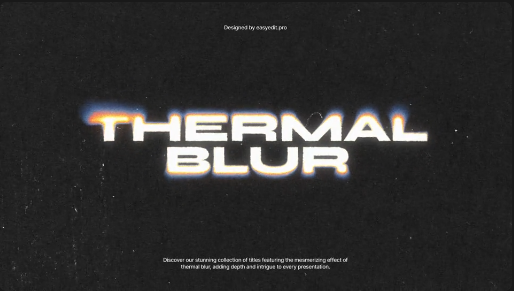
Typography is an important part of visual storytelling because it helps communicate messages, establish a mood, and create a recognizable visual identity. With Free Thermal Blur Typography, you can explore expressive text treatments that move beyond conventional static titles. Blur-inspired distortion can add movement, atmosphere, and visual intensity to your words, making them suitable for projects that require a bold, abstract, or experimental aesthetic.
This Free After Effects text animation template is ideal for music videos, cinematic intros, promotional trailers, fashion edits, creative showreels, and experimental motion graphics. Use the typography to introduce a video, reveal a headline, highlight a phrase, display an artist's name, or create a dramatic title sequence. Combine the animated text with atmospheric footage, dark backgrounds, lighting effects, and carefully selected music to create a cohesive visual presentation.
Content creators can use Free Thermal Blur Typography for Instagram Reels, TikTok videos, YouTube Shorts, YouTube intros, and other social media content. Create eye-catching text animations for motivational edits, aesthetic videos, fashion content, lifestyle montages, creative announcements, and short promotional clips. Distinctive typography can help capture attention quickly and give your videos a more recognizable visual style.
Music producers, DJs, and music video editors can incorporate Free Thermal Blur Typography into lyric videos, track promotions, album announcements, concert visuals, and artist branding. The distorted text aesthetic can complement electronic music, experimental sound design, underground music visuals, and high-energy promotional edits. Synchronizing the typography with the rhythm of the soundtrack can help create a more immersive audiovisual experience.
Brands and businesses can use Free Thermal Blur Typography for digital advertisements, product promotions, creative campaigns, and branded video content. Technology brands, fashion labels, entertainment companies, and creative studios may find this visual style useful when developing bold and unconventional marketing materials. Add brand names, campaign headlines, product messages, or promotional text to create an expressive presentation that stands apart from standard corporate graphics.
Customization allows you to adapt Free Thermal Blur Typography to the requirements of your project. Using Adobe After Effects, you can work with your own text and combine the animation with video clips, photographs, logos, backgrounds, colors, and sound effects. Depending on the original template's available controls, options for changing typography, timing, positioning, blur intensity, and other visual properties may vary. Review the original asset specifications for supported software versions and included features.
Freelance video editors, motion designers, creative agencies, and social media managers can use Free Thermal Blur Typography as a starting point for personal projects and client productions. Ready-made text animation resources can help streamline the creation of title sequences, promotional videos, social media advertisements, music visuals, and creative presentations. Editors can focus on composition, pacing, and storytelling while adapting the typography to each project's visual identity.
For the best results, choose fonts that remain recognizable when animated and ensure sufficient contrast between the text and its background. Use thermal blur effects strategically to emphasize important words, create transitions, or establish a dramatic opening. Combining Free Thermal Blur Typography with controlled lighting, subtle glitch effects, complementary colors, and well-timed sound design can help create a polished result without making the text difficult to read.
Free Thermal Blur Typography is suitable for beginners exploring motion graphics as well as experienced editors seeking distinctive text effects for their creative projects. It can support personal videos, portfolio presentations, social media campaigns, music promotions, advertisements, and professional client work. Before downloading, check the original asset details for compatibility, installation requirements, and available customization options.
Whether you are creating a music video, a futuristic title sequence, a fashion Reel, an experimental short film, a promotional advertisement, or a creative typography showcase, Free Thermal Blur Typography provides a useful starting point for adding distorted, blur-inspired text animation to your content. Explore more Free After Effects templates, typography effects, animated titles, and motion graphics resources on Freevideofx to discover assets for your next project.
Typography is an important part of visual storytelling because it helps communicate messages, establish a mood, and create a recognizable visual identity. With Free Thermal Blur Typography, you can explore expressive text treatments that move beyond conventional static titles. Blur-inspired distortion can add movement, atmosphere, and visual intensity to your words, making them suitable for projects that require a bold, abstract, or experimental aesthetic.
This Free After Effects text animation template is ideal for music videos, cinematic intros, promotional trailers, fashion edits, creative showreels, and experimental motion graphics. Use the typography to introduce a video, reveal a headline, highlight a phrase, display an artist's name, or create a dramatic title sequence. Combine the animated text with atmospheric footage, dark backgrounds, lighting effects, and carefully selected music to create a cohesive visual presentation.
Content creators can use Free Thermal Blur Typography for Instagram Reels, TikTok videos, YouTube Shorts, YouTube intros, and other social media content. Create eye-catching text animations for motivational edits, aesthetic videos, fashion content, lifestyle montages, creative announcements, and short promotional clips. Distinctive typography can help capture attention quickly and give your videos a more recognizable visual style.
Music producers, DJs, and music video editors can incorporate Free Thermal Blur Typography into lyric videos, track promotions, album announcements, concert visuals, and artist branding. The distorted text aesthetic can complement electronic music, experimental sound design, underground music visuals, and high-energy promotional edits. Synchronizing the typography with the rhythm of the soundtrack can help create a more immersive audiovisual experience.
Brands and businesses can use Free Thermal Blur Typography for digital advertisements, product promotions, creative campaigns, and branded video content. Technology brands, fashion labels, entertainment companies, and creative studios may find this visual style useful when developing bold and unconventional marketing materials. Add brand names, campaign headlines, product messages, or promotional text to create an expressive presentation that stands apart from standard corporate graphics.
Customization allows you to adapt Free Thermal Blur Typography to the requirements of your project. Using Adobe After Effects, you can work with your own text and combine the animation with video clips, photographs, logos, backgrounds, colors, and sound effects. Depending on the original template's available controls, options for changing typography, timing, positioning, blur intensity, and other visual properties may vary. Review the original asset specifications for supported software versions and included features.
Freelance video editors, motion designers, creative agencies, and social media managers can use Free Thermal Blur Typography as a starting point for personal projects and client productions. Ready-made text animation resources can help streamline the creation of title sequences, promotional videos, social media advertisements, music visuals, and creative presentations. Editors can focus on composition, pacing, and storytelling while adapting the typography to each project's visual identity.
For the best results, choose fonts that remain recognizable when animated and ensure sufficient contrast between the text and its background. Use thermal blur effects strategically to emphasize important words, create transitions, or establish a dramatic opening. Combining Free Thermal Blur Typography with controlled lighting, subtle glitch effects, complementary colors, and well-timed sound design can help create a polished result without making the text difficult to read.
Free Thermal Blur Typography is suitable for beginners exploring motion graphics as well as experienced editors seeking distinctive text effects for their creative projects. It can support personal videos, portfolio presentations, social media campaigns, music promotions, advertisements, and professional client work. Before downloading, check the original asset details for compatibility, installation requirements, and available customization options.
Whether you are creating a music video, a futuristic title sequence, a fashion Reel, an experimental short film, a promotional advertisement, or a creative typography showcase, Free Thermal Blur Typography provides a useful starting point for adding distorted, blur-inspired text animation to your content. Explore more Free After Effects templates, typography effects, animated titles, and motion graphics resources on Freevideofx to discover assets for your next project.


