

Celebrate the beginning of a beautiful new journey with Free Wedding Invitation 4, an elegant wedding invitation template designed to help you create a memorable digital invitation for your special day. Whether you are preparing an invitation for a traditional Indian wedding, a modern celebration, an engagement ceremony, or a reception, a beautifully designed wedding invitation video can communicate essential event details while creating excitement among family members, friends, and guests.
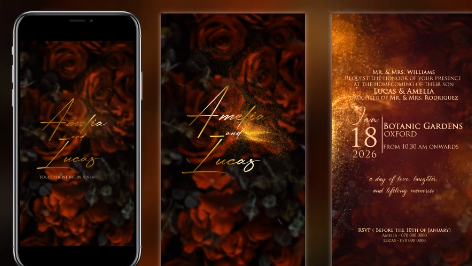
A wedding invitation is more than an announcement. It introduces the couple's celebration, reflects the family's traditions, and sets the mood for the upcoming event. With this Free Wedding Invitation template, you can create a personalized invitation that brings together names, wedding dates, venue information, decorative elements, and meaningful visual details in a coordinated presentation. Use the template as a starting point and customize it according to your preferred wedding theme, cultural traditions, and personal style.
Depending on the original template's features, you may be able to customize the couple's names, event date, venue, invitation message, colors, and other visual elements. Add the details that matter most to your celebration while maintaining a clean and readable layout. The result can be a personalized wedding invitation that feels appropriate for an intimate family gathering or a large celebration.
You can prepare invitations for Hindu weddings, Maharashtrian weddings, Gujarati weddings, Punjabi weddings, South Indian weddings, and other cultural celebrations. Depending on your design preferences and the template's available elements, you may choose to include floral decorations, ornamental borders, traditional patterns, mandala-inspired details, or other culturally appropriate visual motifs.
For a Maharashtrian wedding, for example, you could include the couple's names, the wedding date, the venue, and details about the ceremony in Marathi or English. Ensure that names, dates, and venue information are accurate before sharing the final invitation with guests.
For multiple events, maintain a consistent visual identity while changing the relevant details for each occasion. Use coordinated colors, typography, and decorative elements to connect the different invitations. If the template supports multiple scenes or compositions, you may be able to prepare separate sections for each event, including the date, time, venue, and a short invitation message.
For WhatsApp, consider creating a compact video with clearly visible text and an appropriate aspect ratio for mobile viewing. Keep the invitation message concise and make sure the couple's names, date, venue, and RSVP information remain readable on a smaller screen. For Instagram Stories and Reels, a vertical layout can provide a natural fit, while a landscape version may be more suitable for television screens or conventional video presentations.
Before exporting, review the invitation on a mobile device to confirm that the text is legible and the important details are not cropped. Select a suitable resolution and file size so that the video is easy to share without unnecessarily reducing visual quality.
Begin by opening the project in a compatible version of After Effects and reviewing the included compositions and required assets. Replace the placeholder names and event details with your own information. Check the font availability, media links, and composition settings before making further adjustments.
You can then refine the typography, adjust the duration of individual scenes, and customize the design to match your wedding theme where the project structure allows it. If you want to include regional-language text, confirm that the selected font and software workflow support the required characters correctly. Always preview the complete animation before exporting the final invitation.
Use high-quality graphics and maintain consistent spacing throughout the presentation. Select background music that suits the atmosphere and that you have permission to use. If you include photographs of the couple, use clear images with suitable cropping and lighting. Keep transitions smooth, allow enough time for guests to read the information, and avoid overcrowding the screen with decorative elements.
Before sharing the invitation, carefully verify every name, date, time, venue address, and contact number. Export a test version and watch it from beginning to end on a mobile phone. This final review can help prevent mistakes and ensure that the invitation looks professional across different devices.
It can also be a helpful resource for wedding studios and freelancers who create customized invitation videos for clients. Always check the original template's licensing terms before using it for client projects or commercial work, and confirm the usage rights for any included music, fonts, photographs, or other third-party assets.
Explore Freevideofx for more Free wedding invitation templates, After Effects projects, animated invitations, wedding intros, motion graphics, and creative video resources. Find a design that suits your celebration, personalize it thoughtfully, and share your special announcement with style.
A wedding invitation is more than an announcement. It introduces the couple's celebration, reflects the family's traditions, and sets the mood for the upcoming event. With this Free Wedding Invitation template, you can create a personalized invitation that brings together names, wedding dates, venue information, decorative elements, and meaningful visual details in a coordinated presentation. Use the template as a starting point and customize it according to your preferred wedding theme, cultural traditions, and personal style.
Create an Elegant Digital Wedding Invitation
Digital wedding invitations are a convenient way to share wedding information with guests across different locations. Instead of relying exclusively on printed cards, couples and families can send an animated invitation through WhatsApp, email, social media, and other digital communication platforms. A Free Wedding Invitation video can combine attractive typography, decorative visuals, transitions, and background music to create a more engaging announcement.Depending on the original template's features, you may be able to customize the couple's names, event date, venue, invitation message, colors, and other visual elements. Add the details that matter most to your celebration while maintaining a clean and readable layout. The result can be a personalized wedding invitation that feels appropriate for an intimate family gathering or a large celebration.
Perfect for Traditional Indian Weddings
Indian weddings often feature vibrant colors, cultural symbolism, elaborate decorations, and several ceremonies leading up to the main wedding day. This Free Wedding Invitation template can serve as a creative foundation for invitations inspired by traditional Indian wedding aesthetics. Consider incorporating complementary colors such as red, maroon, gold, ivory, green, or pastel shades to match the event's theme.You can prepare invitations for Hindu weddings, Maharashtrian weddings, Gujarati weddings, Punjabi weddings, South Indian weddings, and other cultural celebrations. Depending on your design preferences and the template's available elements, you may choose to include floral decorations, ornamental borders, traditional patterns, mandala-inspired details, or other culturally appropriate visual motifs.
For a Maharashtrian wedding, for example, you could include the couple's names, the wedding date, the venue, and details about the ceremony in Marathi or English. Ensure that names, dates, and venue information are accurate before sharing the final invitation with guests.
Suitable for Engagements, Receptions, and Pre-Wedding Events
A Free Wedding Invitation design can also be adapted for related celebrations, depending on the original template's layout and customization options. Create invitations for engagement ceremonies, ring ceremonies, haldi, mehendi, sangeet, reception parties, or other pre-wedding and post-wedding gatherings.For multiple events, maintain a consistent visual identity while changing the relevant details for each occasion. Use coordinated colors, typography, and decorative elements to connect the different invitations. If the template supports multiple scenes or compositions, you may be able to prepare separate sections for each event, including the date, time, venue, and a short invitation message.
Share Wedding Invitations on WhatsApp and Social Media
One of the main advantages of a digital wedding invitation is the ability to distribute it quickly. A Free Wedding Invitation video can be prepared for sharing with relatives, friends, colleagues, and guests through WhatsApp, Instagram, Facebook, Telegram, and other supported platforms.For WhatsApp, consider creating a compact video with clearly visible text and an appropriate aspect ratio for mobile viewing. Keep the invitation message concise and make sure the couple's names, date, venue, and RSVP information remain readable on a smaller screen. For Instagram Stories and Reels, a vertical layout can provide a natural fit, while a landscape version may be more suitable for television screens or conventional video presentations.
Before exporting, review the invitation on a mobile device to confirm that the text is legible and the important details are not cropped. Select a suitable resolution and file size so that the video is easy to share without unnecessarily reducing visual quality.
Customize the Design in Adobe After Effects
If Wedding Invitation 4 is supplied as an Adobe After Effects project, you can use After Effects to personalize the animation and visual presentation. Depending on the original template's features, editable elements may include text placeholders, background colors, image layers, decorative graphics, transitions, and timing controls.Begin by opening the project in a compatible version of After Effects and reviewing the included compositions and required assets. Replace the placeholder names and event details with your own information. Check the font availability, media links, and composition settings before making further adjustments.
You can then refine the typography, adjust the duration of individual scenes, and customize the design to match your wedding theme where the project structure allows it. If you want to include regional-language text, confirm that the selected font and software workflow support the required characters correctly. Always preview the complete animation before exporting the final invitation.
What Information Should a Wedding Invitation Include?
A professional wedding invitation should present the essential details clearly and attractively. Depending on the type of celebration, consider including the following information:- Couple's names: Display the names prominently so guests can immediately identify the wedding.
- Wedding date and time: Include the correct date and ceremony time.
- Venue details: Provide the venue name and complete address, with a map link in the accompanying message if helpful.
- Family invitation message: Add a short, warm message from the couple or their families.
- Additional ceremonies: Include information about the reception or other events when relevant.
- RSVP information: Add contact details or an RSVP deadline if guests need to confirm attendance.
- Dress code or special instructions: Include these only when they are relevant to the celebration.
Tips for a Beautiful Wedding Invitation Video
Choose a visual style that reflects the couple's personality and the overall wedding theme. Classic typography and restrained ornamentation can create a timeless look, while bright colors and energetic animation may suit a lively celebration. Make sure the visual design complements the event rather than distracting viewers from the invitation details.Use high-quality graphics and maintain consistent spacing throughout the presentation. Select background music that suits the atmosphere and that you have permission to use. If you include photographs of the couple, use clear images with suitable cropping and lighting. Keep transitions smooth, allow enough time for guests to read the information, and avoid overcrowding the screen with decorative elements.
Before sharing the invitation, carefully verify every name, date, time, venue address, and contact number. Export a test version and watch it from beginning to end on a mobile phone. This final review can help prevent mistakes and ensure that the invitation looks professional across different devices.
Who Can Use Free Wedding Invitation 4?
This Free Wedding Invitation template is useful for couples planning their wedding, families preparing digital invitations, wedding photographers, event planners, invitation designers, video editors, and creative professionals. Beginners can use a template-based workflow to simplify the process of producing an animated invitation, while experienced editors can adapt supported elements to match a client's requirements.It can also be a helpful resource for wedding studios and freelancers who create customized invitation videos for clients. Always check the original template's licensing terms before using it for client projects or commercial work, and confirm the usage rights for any included music, fonts, photographs, or other third-party assets.
Download Free Wedding Invitation 4 from Freevideofx
Make your wedding announcement special with Free Wedding Invitation 4, a creative starting point for preparing an elegant and personalized digital wedding invitation. Customize the available design elements, add your event details, and create a video that can be shared conveniently with family members, friends, and guests.Explore Freevideofx for more Free wedding invitation templates, After Effects projects, animated invitations, wedding intros, motion graphics, and creative video resources. Find a design that suits your celebration, personalize it thoughtfully, and share your special announcement with style.


