

Bring your digital conversations to life with a Free WhatsApp Message Animation Template from Freevideofx. Inspired by the familiar messaging experience, this type of template helps creators present chat conversations, incoming messages, typing animations, and smartphone interactions in an engaging video format. Whether you are producing a social media advertisement, a storytelling video, a product demonstration, a tutorial, or a creative promotional campaign, an animated messaging template can help you communicate information through a relatable visual format.
Messaging-based videos are popular because they present information in a conversational way. Instead of displaying a long paragraph or static screenshot, you can reveal messages one by one, create a sense of anticipation, and guide viewers through a conversation. This format works particularly well for short stories, humorous exchanges, customer testimonials, product announcements, and instructional content.
With a Free WhatsApp Message animation template, you can explore chat-style storytelling and create engaging video content without building every visual element from scratch.
These templates allow creators to present a conversation as a visual sequence. Individual messages can appear at different times to match narration, music, sound effects, or the pacing of a story.
The format is suitable for storytelling, educational demonstrations, social media content, product explainers, and marketing videos. The exact appearance and available customization options depend on the specific template and its included project files.
A Free WhatsApp Message template can help beginners experiment with animation while allowing experienced editors to produce conversational videos more efficiently. It can also help maintain a consistent visual style across multiple scenes or social media campaigns.
Freevideofx helps creators discover video editing resources, text animations, motion graphics, transitions, and other creative assets. Before using a particular messaging template, check its file format, supported software, available customization options, and licensing terms.
Typing and Message Reveals: Create a conversational rhythm by revealing text in stages where the original animation supports it.
Customizable Text: Replace sample messages with your own dialogue, captions, instructions, or promotional content when editable text layers are available.
Smartphone-Style Presentation: Some templates may include phone frames or interface-inspired layouts to make the conversation feel more familiar.
Flexible Timing: Adjust supported animation timing to match voice-over narration, sound effects, or the sequence of your video.
Storytelling Potential: Use animated conversations to introduce characters, reveal information, explain a process, or build anticipation.
Multiple Content Applications: Adapt the chat animation for social media videos, tutorials, advertisements, presentations, and creative storytelling projects.
The exact features depend on the specific asset and its included files.
YouTube Videos: Add chat-style scenes to storytelling videos, commentary, tutorials, and entertainment content.
Instagram Reels: Create short conversational videos with a strong opening message, a sequence of replies, and a clear conclusion.
Product Promotions: Present customer questions, product benefits, service details, or common problems in a conversational format.
Educational Tutorials: Demonstrate how a messaging workflow works or explain digital communication concepts through a simulated conversation.
Business Presentations: Illustrate customer interactions, communication scenarios, service processes, and fictional case studies.
Comedy and Entertainment: Build humorous exchanges, unexpected replies, or relatable conversations using carefully timed message reveals.
App and Website Demonstrations: Show how a messaging-related feature works when the template supports the required visual customization.
Personalized Greetings: Create birthday messages, celebration videos, or special announcements presented as an animated conversation.
Digital Marketing Campaigns: Use chat-style visuals to introduce a campaign idea, explain an offer, or present frequently asked questions.
Content creators can use animated chats to develop entertaining stories, while marketers can present product information in a familiar conversational format. Freelancers may incorporate suitable templates into client videos, and educators can use simulated messages to explain digital communication or demonstrate workflows.
Beginners can also learn how text animation, scene timing, and visual hierarchy work together by experimenting with a ready-made project.
When creating simulated conversations, use fictional names and messages or obtain permission before including real conversations. Avoid presenting invented testimonials or fabricated messages as genuine customer communications.
1. Open the Project: Launch a compatible version of After Effects and open the supplied project file.
2. Locate the Message Compositions: Review the project panel and timeline to identify editable text layers, chat bubbles, and other conversation elements.
3. Replace the Sample Messages: Enter your own dialogue, keeping each message concise enough to fit within its designated area.
4. Adjust Text Formatting: Where supported, customize font size, alignment, colors, and spacing to maintain readability.
5. Arrange the Conversation: Place messages in a logical order so the viewer can follow the exchange naturally.
6. Refine the Animation Timing: Adjust available keyframes or controls to reveal messages at appropriate moments.
7. Add Audio if Needed: Use narration, notification-style sound effects, or background music when they support the intended presentation.
8. Preview the Entire Sequence: Check that text is readable, message bubbles fit the wording, and the conversation progresses smoothly.
9. Export the Video: Render the finished animation using settings appropriate for your intended platform and review the final file before publishing.
These instructions apply to compatible After Effects projects. Other formats may require different software or editing methods.
Use Natural Dialogue: Write messages that sound like a realistic conversation rather than a series of formal paragraphs.
Maintain Consistent Spacing: Keep message bubbles, text, and interface elements aligned to create a clean visual layout.
Control the Timing: Give viewers enough time to read each message before introducing the next one.
Build a Clear Story: Make sure each message contributes to the conversation and moves the narrative forward.
Use Sound Selectively: Notification sounds and subtle audio accents can reinforce message reveals, but excessive sound effects may become distracting.
Optimize for Mobile Viewing: Check the final video on a smaller screen and ensure that the text remains easy to read.
Avoid Overloading the Screen: Too many messages at once can make the conversation difficult to follow. Keep the layout focused on the most important information.
Protect Personal Information: Do not expose private phone numbers, real message histories, contact details, or sensitive information without appropriate permission.
For Instagram Reels and YouTube Shorts, begin with an interesting opening message, introduce a few replies, and build toward a clear conclusion or unexpected moment. Keep the pacing comfortable so viewers can read the messages without pausing the video.
For educational and promotional content, use the conversation to answer a question, demonstrate a process, or explain a benefit. Keep the information accurate and make sure the final message communicates the main takeaway.
A consistent animation style, readable text, and thoughtful timing can make the video feel polished while keeping the conversation easy to understand.
Freelancers and video editors can use suitable templates to create social media campaigns, promotional clips, educational videos, and branded storytelling projects. Agencies may also adapt the animation style to suit a client's visual identity.
If you use a messaging template in commercial work, check its licensing terms. Also, ensure that any simulated brand interface is presented appropriately and does not falsely imply endorsement or affiliation.
This format can be used for comedy, education, promotional storytelling, or fictional scenarios. The key is to keep the conversation focused and ensure that the animation supports the message rather than distracting from it.
By combining clear writing, natural dialogue, appropriate timing, and readable layouts, you can turn a simple conversation into an engaging visual sequence.
Explore different chat animation styles and customize the available text and visual elements to suit your creative goals. Use fictional conversations responsibly, keep important information readable, and tailor the pacing to your audience.
Explore the Free WhatsApp Message Animation Template on Freevideofx and bring your conversations to life through motion graphics. Create engaging chat-style stories, present information in a familiar format, and give your next video project a creative messaging-inspired presentation.
Messaging-based videos are popular because they present information in a conversational way. Instead of displaying a long paragraph or static screenshot, you can reveal messages one by one, create a sense of anticipation, and guide viewers through a conversation. This format works particularly well for short stories, humorous exchanges, customer testimonials, product announcements, and instructional content.
With a Free WhatsApp Message animation template, you can explore chat-style storytelling and create engaging video content without building every visual element from scratch.
What Is a WhatsApp Message Animation Template?
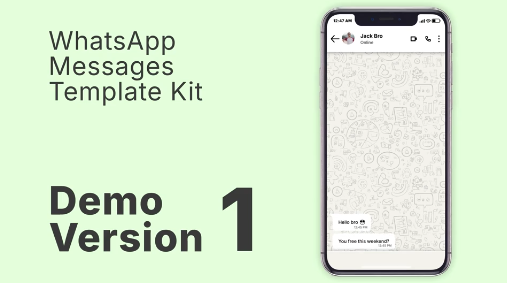
A WhatsApp message animation template is a pre-designed video or motion graphics project that recreates the visual style of a messaging conversation. Depending on the original asset, it may include chat bubbles, message reveals, typing indicators, timestamps, notification-style elements, smartphone frames, and animated text.These templates allow creators to present a conversation as a visual sequence. Individual messages can appear at different times to match narration, music, sound effects, or the pacing of a story.
The format is suitable for storytelling, educational demonstrations, social media content, product explainers, and marketing videos. The exact appearance and available customization options depend on the specific template and its included project files.
Why Choose a Free WhatsApp Message Template?
Creating an animated chat sequence from scratch can require designing message bubbles, aligning text, animating elements, and carefully timing each conversation. A ready-made template provides an existing structure that can simplify these tasks.A Free WhatsApp Message template can help beginners experiment with animation while allowing experienced editors to produce conversational videos more efficiently. It can also help maintain a consistent visual style across multiple scenes or social media campaigns.
Freevideofx helps creators discover video editing resources, text animations, motion graphics, transitions, and other creative assets. Before using a particular messaging template, check its file format, supported software, available customization options, and licensing terms.
Key Features and Creative Possibilities
Animated Chat Bubbles: Present messages through visual elements that appear progressively, depending on the template's design.Typing and Message Reveals: Create a conversational rhythm by revealing text in stages where the original animation supports it.
Customizable Text: Replace sample messages with your own dialogue, captions, instructions, or promotional content when editable text layers are available.
Smartphone-Style Presentation: Some templates may include phone frames or interface-inspired layouts to make the conversation feel more familiar.
Flexible Timing: Adjust supported animation timing to match voice-over narration, sound effects, or the sequence of your video.
Storytelling Potential: Use animated conversations to introduce characters, reveal information, explain a process, or build anticipation.
Multiple Content Applications: Adapt the chat animation for social media videos, tutorials, advertisements, presentations, and creative storytelling projects.
The exact features depend on the specific asset and its included files.
Best Uses for WhatsApp Message Animation Templates
Social Media Storytelling: Present short stories through a sequence of fictional messages. This approach can work well for suspense, comedy, relatable situations, and everyday-life scenarios.YouTube Videos: Add chat-style scenes to storytelling videos, commentary, tutorials, and entertainment content.
Instagram Reels: Create short conversational videos with a strong opening message, a sequence of replies, and a clear conclusion.
Product Promotions: Present customer questions, product benefits, service details, or common problems in a conversational format.
Educational Tutorials: Demonstrate how a messaging workflow works or explain digital communication concepts through a simulated conversation.
Business Presentations: Illustrate customer interactions, communication scenarios, service processes, and fictional case studies.
Comedy and Entertainment: Build humorous exchanges, unexpected replies, or relatable conversations using carefully timed message reveals.
App and Website Demonstrations: Show how a messaging-related feature works when the template supports the required visual customization.
Personalized Greetings: Create birthday messages, celebration videos, or special announcements presented as an animated conversation.
Digital Marketing Campaigns: Use chat-style visuals to introduce a campaign idea, explain an offer, or present frequently asked questions.
Ideal for Content Creators, Editors, and Marketers
Free WhatsApp Message animation templates can be useful for social media creators, video editors, digital marketers, freelancers, educators, and businesses.Content creators can use animated chats to develop entertaining stories, while marketers can present product information in a familiar conversational format. Freelancers may incorporate suitable templates into client videos, and educators can use simulated messages to explain digital communication or demonstrate workflows.
Beginners can also learn how text animation, scene timing, and visual hierarchy work together by experimenting with a ready-made project.
When creating simulated conversations, use fictional names and messages or obtain permission before including real conversations. Avoid presenting invented testimonials or fabricated messages as genuine customer communications.
How to Customize a WhatsApp Message Template in After Effects
If the asset includes an Adobe After Effects project, you can generally follow these steps. The exact workflow depends on the structure of the original template.1. Open the Project: Launch a compatible version of After Effects and open the supplied project file.
2. Locate the Message Compositions: Review the project panel and timeline to identify editable text layers, chat bubbles, and other conversation elements.
3. Replace the Sample Messages: Enter your own dialogue, keeping each message concise enough to fit within its designated area.
4. Adjust Text Formatting: Where supported, customize font size, alignment, colors, and spacing to maintain readability.
5. Arrange the Conversation: Place messages in a logical order so the viewer can follow the exchange naturally.
6. Refine the Animation Timing: Adjust available keyframes or controls to reveal messages at appropriate moments.
7. Add Audio if Needed: Use narration, notification-style sound effects, or background music when they support the intended presentation.
8. Preview the Entire Sequence: Check that text is readable, message bubbles fit the wording, and the conversation progresses smoothly.
9. Export the Video: Render the finished animation using settings appropriate for your intended platform and review the final file before publishing.
These instructions apply to compatible After Effects projects. Other formats may require different software or editing methods.
Tips for Creating Professional Chat Animations
Keep Messages Concise: Short messages are easier to read and make the conversation feel natural. Break long explanations into multiple messages when appropriate.Use Natural Dialogue: Write messages that sound like a realistic conversation rather than a series of formal paragraphs.
Maintain Consistent Spacing: Keep message bubbles, text, and interface elements aligned to create a clean visual layout.
Control the Timing: Give viewers enough time to read each message before introducing the next one.
Build a Clear Story: Make sure each message contributes to the conversation and moves the narrative forward.
Use Sound Selectively: Notification sounds and subtle audio accents can reinforce message reveals, but excessive sound effects may become distracting.
Optimize for Mobile Viewing: Check the final video on a smaller screen and ensure that the text remains easy to read.
Avoid Overloading the Screen: Too many messages at once can make the conversation difficult to follow. Keep the layout focused on the most important information.
Protect Personal Information: Do not expose private phone numbers, real message histories, contact details, or sensitive information without appropriate permission.
Create Engaging WhatsApp-Style Videos for Social Media
Chat-based videos can be effective for short-form content because they establish a familiar situation quickly and encourage viewers to follow the conversation.For Instagram Reels and YouTube Shorts, begin with an interesting opening message, introduce a few replies, and build toward a clear conclusion or unexpected moment. Keep the pacing comfortable so viewers can read the messages without pausing the video.
For educational and promotional content, use the conversation to answer a question, demonstrate a process, or explain a benefit. Keep the information accurate and make sure the final message communicates the main takeaway.
A consistent animation style, readable text, and thoughtful timing can make the video feel polished while keeping the conversation easy to understand.
Benefits for Businesses and Freelancers
Messaging-style animation can help businesses present information in a conversational format. It can be useful for explaining customer service processes, illustrating common questions, demonstrating communication workflows, and introducing products or services.Freelancers and video editors can use suitable templates to create social media campaigns, promotional clips, educational videos, and branded storytelling projects. Agencies may also adapt the animation style to suit a client's visual identity.
If you use a messaging template in commercial work, check its licensing terms. Also, ensure that any simulated brand interface is presented appropriately and does not falsely imply endorsement or affiliation.
Improve Your Storytelling with Animated Messages
An animated conversation can create a simple but effective narrative structure. The first message introduces a situation, the following messages develop the idea, and the final reply delivers the conclusion.This format can be used for comedy, education, promotional storytelling, or fictional scenarios. The key is to keep the conversation focused and ensure that the animation supports the message rather than distracting from it.
By combining clear writing, natural dialogue, appropriate timing, and readable layouts, you can turn a simple conversation into an engaging visual sequence.
Discover Free Message Animation Templates on Freevideofx
Freevideofx helps creators discover text animations, motion graphics, video templates, transitions, and other digital resources for video production. Whether you are creating a fictional chat story, a tutorial, a social media advertisement, or an educational video, a suitable messaging template can help simplify your workflow.Explore different chat animation styles and customize the available text and visual elements to suit your creative goals. Use fictional conversations responsibly, keep important information readable, and tailor the pacing to your audience.
Explore the Free WhatsApp Message Animation Template on Freevideofx and bring your conversations to life through motion graphics. Create engaging chat-style stories, present information in a familiar format, and give your next video project a creative messaging-inspired presentation.


