

Add energy, movement, and a distinctive visual style to your video projects with this Free Camera Shake, Motion Blur, Flicker & RGB Toolkit for After Effects. Designed for motion designers, video editors, and content creators, this toolkit brings together popular visual effects that can help enhance transitions, create dynamic movement, and add cinematic character to your footage.
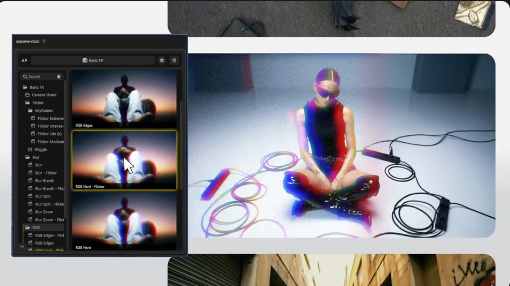
From subtle camera movements to dramatic RGB distortions, motion blur, and flickering effects, these visual treatments can make ordinary footage feel more dynamic and engaging. Whether you are producing cinematic edits, music videos, action sequences, promotional content, or social media reels, this Free After Effects toolkit can be a useful addition to your creative workflow.
1. Camera Shake
Create the appearance of handheld camera movement or impact-based motion. Camera shake effects can add intensity to action scenes, transitions, dramatic reveals, and cinematic sequences.
2. Motion Blur
Enhance the sense of movement by introducing visual blur during fast motion. Motion blur is useful for transitions, animated titles, moving objects, and dynamic graphic elements.
3. Flicker Effect
Introduce controlled brightness or visibility variations to create energetic visual moments. Flicker effects can complement music videos, horror edits, dramatic sequences, and stylized promotional content.
4. RGB Effect
Create a color-channel separation or chromatic distortion appearance for a digital glitch-inspired aesthetic. RGB effects are useful for futuristic visuals, technology videos, music edits, and experimental motion graphics.
The exact controls, presets, and implementation methods depend on the original toolkit's included files and features.
Cinematic Video Editors: Enhance action scenes, impact moments, dramatic transitions, and stylized footage.
Motion Graphics Designers: Apply visual treatments to animated typography, shapes, titles, and graphic compositions.
Social Media Creators: Make Instagram Reels, YouTube Shorts, and promotional edits more dynamic with creative visual effects.
Content Production Agencies: Use these effects to enhance advertisements, branded videos, product promotions, and digital campaigns.
Whether you are a beginner learning After Effects or an experienced editor refining your motion graphics workflow, this Free toolkit can help you experiment with dynamic visual effects and develop more engaging video content.
Discover more Free After Effects tools, video effects, transitions, presets, motion graphics, and creative resources at Freevideofx. Explore useful assets to enhance your editing workflow and bring your next video project to life.
From subtle camera movements to dramatic RGB distortions, motion blur, and flickering effects, these visual treatments can make ordinary footage feel more dynamic and engaging. Whether you are producing cinematic edits, music videos, action sequences, promotional content, or social media reels, this Free After Effects toolkit can be a useful addition to your creative workflow.
Explore Different Visual Effects
This toolkit focuses on four commonly used visual effect styles:1. Camera Shake
Create the appearance of handheld camera movement or impact-based motion. Camera shake effects can add intensity to action scenes, transitions, dramatic reveals, and cinematic sequences.
2. Motion Blur
Enhance the sense of movement by introducing visual blur during fast motion. Motion blur is useful for transitions, animated titles, moving objects, and dynamic graphic elements.
3. Flicker Effect
Introduce controlled brightness or visibility variations to create energetic visual moments. Flicker effects can complement music videos, horror edits, dramatic sequences, and stylized promotional content.
4. RGB Effect
Create a color-channel separation or chromatic distortion appearance for a digital glitch-inspired aesthetic. RGB effects are useful for futuristic visuals, technology videos, music edits, and experimental motion graphics.
The exact controls, presets, and implementation methods depend on the original toolkit's included files and features.
Ideal for Different Creative Projects
Music Video Editors: Add energetic camera movements, RGB distortions, and flickering visuals to match the rhythm and mood of music.Cinematic Video Editors: Enhance action scenes, impact moments, dramatic transitions, and stylized footage.
Motion Graphics Designers: Apply visual treatments to animated typography, shapes, titles, and graphic compositions.
Social Media Creators: Make Instagram Reels, YouTube Shorts, and promotional edits more dynamic with creative visual effects.
Content Production Agencies: Use these effects to enhance advertisements, branded videos, product promotions, and digital campaigns.
Customization and Editing Guide
If the original download includes an After Effects project or compatible effect presets, follow these general steps:- Open Adobe After Effects and create or open your video composition.
- Import the footage, graphics, or animation you want to enhance.
- Review the toolkit's included project files, presets, or instructions.
- Apply the appropriate camera shake, motion blur, flicker, or RGB effect.
- Adjust the available parameters to achieve the desired visual intensity.
- Preview the result and refine the timing of each effect.
- Export your final composition using suitable render settings.
Professional Tips for Better Results
- Use camera shake selectively to emphasize important moments rather than applying it continuously.
- Match motion blur intensity with the speed and direction of movement.
- Keep flicker effects controlled to avoid distracting visual interruptions.
- Apply RGB separation strategically for a more effective glitch-inspired appearance.
- Synchronize visual effects with music beats and sound effects.
- Preview your composition at full resolution to check for unwanted artifacts.
- Avoid stacking too many effects when a simpler treatment communicates the idea better.
Perfect for Social Media and Video Production
Use these effects in Instagram Reels, YouTube Shorts, TikTok edits, music videos, gaming montages, cinematic trailers, advertisements, and promotional videos. They can also be incorporated into documentary sequences, experimental visuals, and motion graphics presentations.Why Choose This Free After Effects Toolkit?
A versatile effects toolkit can save editing time and provide more creative flexibility when producing professional-looking videos. By combining camera shake, motion blur, flicker, and RGB-style effects, this resource offers several useful visual treatments for different editing styles.Whether you are a beginner learning After Effects or an experienced editor refining your motion graphics workflow, this Free toolkit can help you experiment with dynamic visual effects and develop more engaging video content.
Discover more Free After Effects tools, video effects, transitions, presets, motion graphics, and creative resources at Freevideofx. Explore useful assets to enhance your editing workflow and bring your next video project to life.


